Participating Frequently
January 7, 2018
Answered

How to re-associate original raw and cloud restored smart preview?

  • January 7, 2018
  • 2 replies
  • 748 views

Hi!

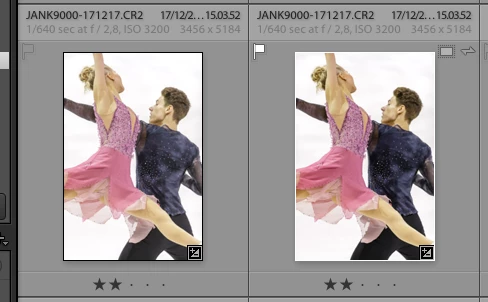
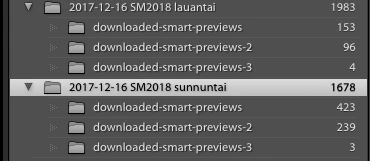
Woke up this morning with broken? catalog: in 3 recent folders out of 22 I was suddenly missing 2000 photos. "Synchronize Folder..." restored the original raw files back into the catalog, and without any further manual action lightroom automatically downloaded the latest smart previews from the cloud with all edits from lightroom mobile into six subfolders "downloaded-smart-previews-..". So all data was restored ok. But, they are now in separate files next to each other, and the originals seem to have some "old" smart previews associated, see the attached photos. In some cases lightroom also automatically grouped the original and downloaded smart preview file together. I also noticed that lightroom restored the first related Collection that was missing, but the second one seem to have lost its content and counts 0 photos.

How do I now restore the association on the original raw file with the latest smart preview file next to it, please?

Janne
This topic has been closed for replies.
Correct answer dj_paige

Yes, this time, I will survive by exporting the newest folders to new catalog and use the backup catalog. Just wondering if there was any known issue causing this, or recommended procedure for this? I mean instead of photo count of 1981 I was suddenly looking at photo count of 153 on the first folder, and 200 on the second. I had only a fraction of those in two collections synced to cloud. What was I supposed to do but to start re-importing the originals.. ?


jannekoistinen  wrote

Yes, this time, I will survive by exporting the newest folders to new catalog and use the backup catalog. Just wondering if there was any known issue causing this, or recommended procedure for this? I mean instead of photo count of 1981 I was suddenly looking at photo count of 153 on the first folder, and 200 on the second. I had only a fraction of those in two collections synced to cloud. What was I supposed to do but to start re-importing the originals.. ?

Exporting photos followed by importing photos into a backup catalog -- NOT RECOMMENDED.

Instead, in the original catalog ... select the desired photos and then use the menu command File->Export as Catalog.

Then, in the backup catalog, use File->Import from Another Catalog.

2 replies

Just Shoot Me
Legend
January 7, 2018

I think what you are showing in your screen shot of the Folders section of the Library modules left hand panel in LR Classic CC is where LR CC, Mobile, and or LR Web are downloading the Smart Previews from the images you added to LR CC Mobile on your Phone or Pad.

To get the original RAW images on your computer you will need to import them in to LR Classic CC.

Not really sure as I have never tried doing that.

Participating Frequently
January 7, 2018

Hi! Original raw files were imported from cards into Classic CC, into two folders as above. Then small part of them were picked and synced (900) to mobile in two collections for editing. All edits were synced back to Classic CC just fine, and exported and delivered to client, ok.

Two weeks later, this morning that is, the Classic CC catalog seemed to lost major part of the photos, and the first collection was disappeared and the second collection photo count was 0, and Folders section showed the photo count of 153 and 200 in the original folders. So I was not missing the location of original ones but the catalog did not have photos available at all. This is where I started my cup of coffee today, and the rest is described above.

For now, I will survive with the backup file but do you know if there was a way to survive in case I did not had it ? I.e. any way to re-associate the original raw with the smart preview next to it, but to remove the original and re-locate the original for the smart preview = manual operation one-by-one...

Just Shoot Me
Legend
January 7, 2018

Ok I did get that from your first post. Sorry for the confusion.

dj_paige
Legend
January 7, 2018

Synchronize Folder is not the way to fix missing photos.

Do you have a backup of the catalog file from just before you did this Synchronize Folders?

Participating Frequently
January 7, 2018

I have a backup of the catalog file available from days of the damaged folders but that one will miss the latest work on some 2k photos in the very latest folders that are in very perfect condition...

dj_paige
Legend
January 7, 2018

Then I think you have to delete the photos or folders that you don't want, making sure that you have selected the one(s) you don't want, and keeping the ones you do want. Make sure that the ones you keep have your edits and user-provided metadata.