Participating Frequently
October 22, 2022
Question

how to reconnect to LRC directory

  • October 22, 2022
  • 3 replies
  • 208 views

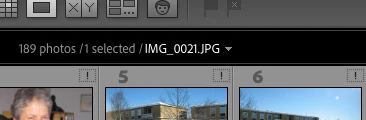
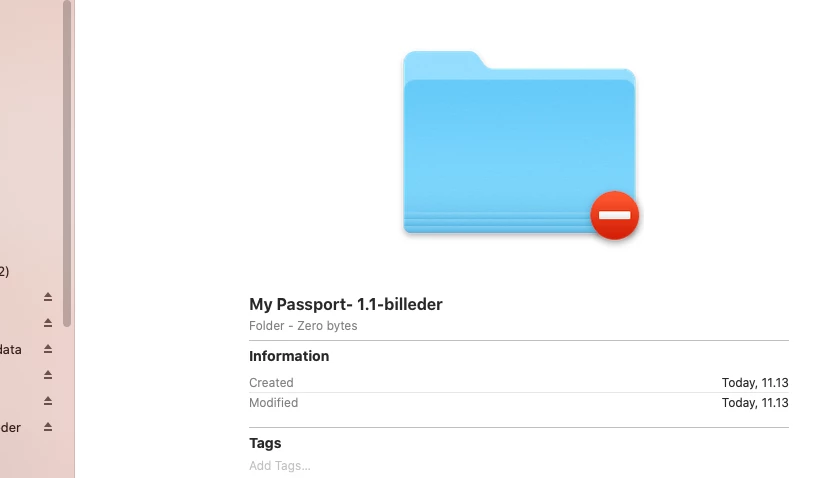
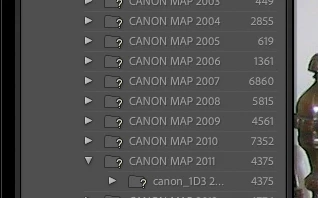
when I open LR Classic, LRC opens but there are "question marks" (?) next to all folders and "exclamation marks" (!) at all previews. Trying to find images / folders "show in finder" here I get this message "the selected catalog is not available" with a "no entry" sign. I can open images directly from the hard drive and work with them in another photo program. How do I get back to my catalog?
This topic has been closed for replies.

3 replies

KR Seals
Community Expert
Community Expert
October 22, 2022

In that case, in the folder panel for that drive (Library Module), right click on the top level folder and choose "Update folder location" and choose the drive and folder where the images are located. See if that helps.

Another thing to try is to reset the LrC preferences.

Ken Seals - Nikon Z 9, Z 8, 14mm-800mm. Computer Win 11 Pro, I7-14700K, 64GB, RTX3070TI. Travel machine: 2021 MacBook Pro M1 MAX 64GB. All Adobe apps.
jens-lyttAuthor
Participating Frequently
October 23, 2022

thanks for the help. Fixed the problem from another HD and deleted the faulty lrcat.. now run LRC again. thanks
Jens Andersen

KR Seals
Community Expert
Community Expert
October 22, 2022

Did the drive or any of the folders get renamed outside Lightroom Classic?

Ken Seals - Nikon Z 9, Z 8, 14mm-800mm. Computer Win 11 Pro, I7-14700K, 64GB, RTX3070TI. Travel machine: 2021 MacBook Pro M1 MAX 64GB. All Adobe apps.
jens-lyttAuthor
Participating Frequently
October 22, 2022

Nope. yesterday worked with LRC without problems. Today I booted up my Mac and opened LRC as usual and then got these error messages??
Jens Andersen

KR Seals
Community Expert
Community Expert
October 22, 2022

According to your screen shots, the Passport drive is not being seen by the operating system nor Lightroom Classic. If you restore the connection to that drive, you should see the question marks disappear.

Ken Seals - Nikon Z 9, Z 8, 14mm-800mm. Computer Win 11 Pro, I7-14700K, 64GB, RTX3070TI. Travel machine: 2021 MacBook Pro M1 MAX 64GB. All Adobe apps.
jens-lyttAuthor
Participating Frequently
October 22, 2022

i have rebooted the system it didn't fix the problem. There is a connection HD where the catalog and files are located, and as I said I can open the image files in another program?
Jens Andersen