
Participating Frequently
August 2, 2024
Question

How to redirect Lightroom Classic catalogues to an acceptable new folder.

  • August 2, 2024
  • 2 replies
  • 211 views

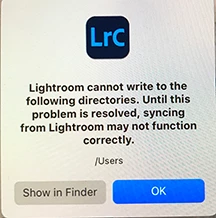
Hi, I use an Imac  Sonoma 14.5 and when using Lightroom Classic the below message comes up : When investigating I find the folder "pictures" within "users" that contains all the backups. Normally I ignore the message, but now I notice the picturequality of the website I was exporting was inadequate. Also yesterday when I imported a new folder, no pictures were imported, just a set of plain colours. obviously something is very wrong.
    This topic has been closed for replies.

    2 replies

    JohanElzenga
    Community Expert
    Community Expert
    August 2, 2024

    Go to Preferences - Lightroom Sync and change the location for photos that are synced down from the cloud. That location is now set to /Users, but that directory is off limits to Lightroom. So click on the 'Choose...' button and select another folder.


    -- Johan W. Elzenga
    kglad
    Community Expert
    Community Expert
    August 2, 2024

    in the future, to find the best place to post your message, use the list here, https://community.adobe.com/

    p.s. i don't think the adobe website, and forums in particular, are easy to navigate, so don't spend a lot of time searching that forum list. do your best and we'll move the post (like this one has already been moved) if it helps you get responses.


    <"moved from using the community">