Known Participant
January 9, 2022
Question

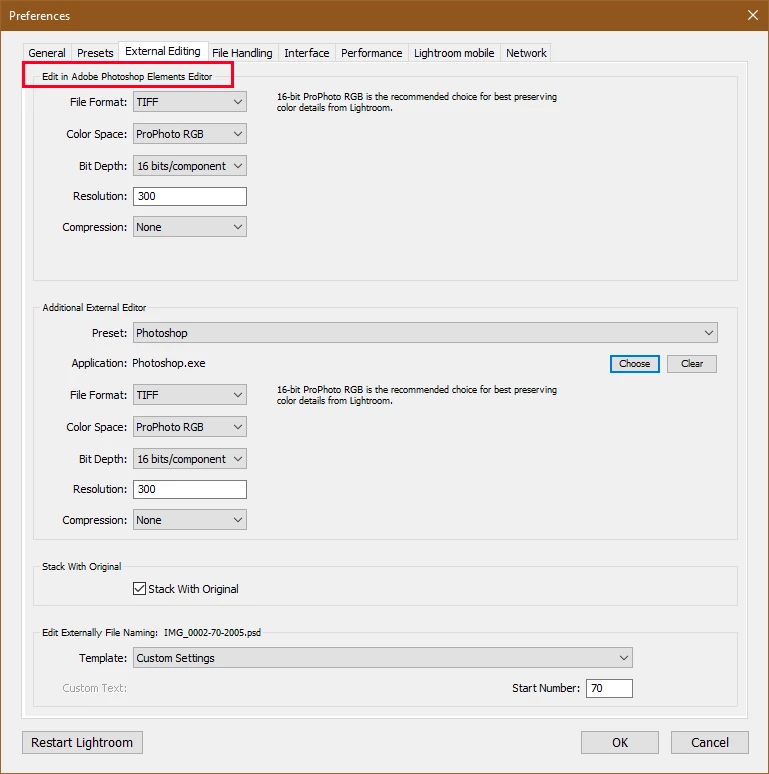
How to remove Adobe Photoshop Elements External Editor in LR

  • January 9, 2022
  • 1 reply
  • 141 views

I have photoshop installed on my machine and never use PSE as an editor. I do not know why LR switched from PS to PSE as an editor, but I cannot figure out how to permanently remove it without deleting the software from my computer. 
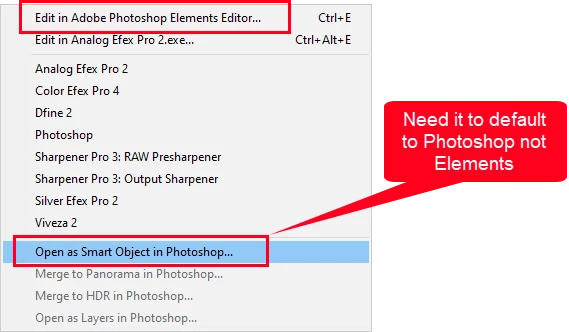


Right now it defaults to PSE, so if I want to open it as a smart object in PS, it opens it in PSE.

This topic has been closed for replies.

1 reply

Rob_Cullen
Community Expert
Community Expert
January 9, 2022

Try A reinstall Of Photoshop, to change.

Uninstall then reinstall Photoshop 2022 from your Adobe Creative Cloud Desktop App.

 This suggestion is "Solution 1" at-

https://helpx.adobe.com/lightroom-classic/kb/edit-photoshop-command-missing-photoshop.html


You could also try "Solution 2" if you are confident to edit the Windows Registry.


Regards. My System: Windows-11, Lightroom-Classic 15.3, Photoshop 27.5, ACR 18.3, Lightroom 9.3, Lr-iOS 10.4.0, Bridge 16.0.3 .