
Participant
October 26, 2019
Question

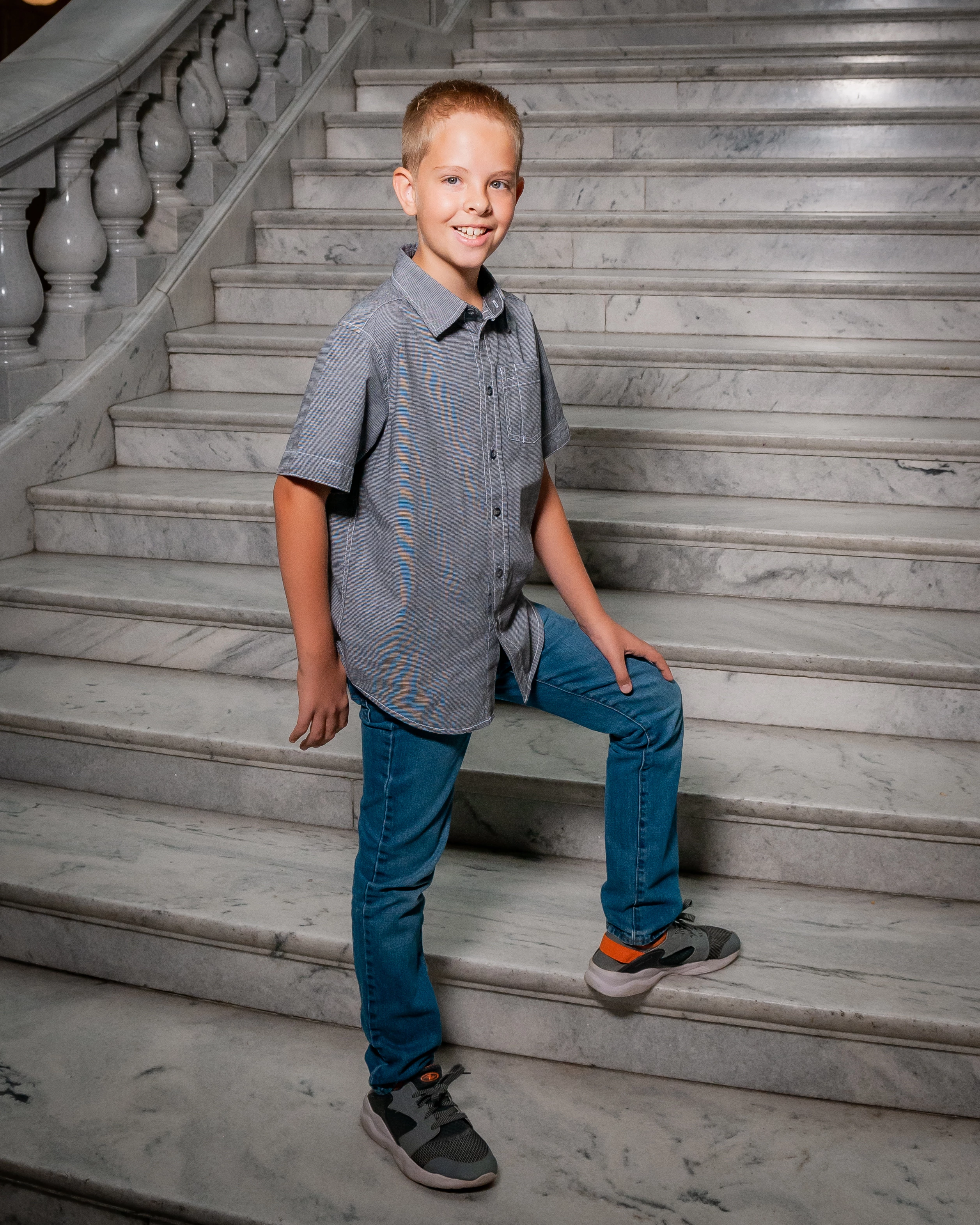
how to remove what looks like some color aberration on a shirt

  • October 26, 2019
  • 6 replies
  • 2067 views

I am trying to figure out how to remove the weird blue/yellow banding that is appearing on his shirt I have it worse on other shots and none of it on other shots not even sure why it is showing up?
    6 replies

    Bob Somrak
    Legend
    October 26, 2019

    As everyone else said, Moire plus setting (I used 100) with the brush will fix this.


    M4 Pro Mac Mini. 48GB
    Per Berntsen
    Community Expert
    Community Expert
    October 26, 2019

    And, very important: Work at 1:1 magnification when removing the moire. 

    This also applies to sharpening, noise reduction, and removing chromatic abberation.

    Conrad_C
    Community Expert
    Community Expert
    October 26, 2019

    You should definitely try the Moire adjustment suggested by JimHess. This type of problem is why the Moire adjustment exists. Here is an article describing how to use it with clothing:

    https://scottkelby.com/a-little-known-feature-of-photoshop-and-lightroom-to-the-rescue/


    It is true that an anti-aliasing filter in a camera can help prevent this. However, some cameras intentionally leave out the anti-aliasing filter to produce sharper images, so if you have one of those cameras (I do) you have to be ready to apply the Moire adjustment for times when it appears.

    JP Hess
    Inspiring
    October 26, 2019

    Try using the brush or the radial filter, and see what you can do with the moire adjustment.

    Just Shoot Me
    Legend
    October 26, 2019

    I moved your post to the LR Classic forum as this pertains to ACR, LR and or PS.


    What you are seeing is Moire which is an artifact of the digital sensor and some fabrics.


    https://www.google.com/search?q=moire&oq=moire&aqs=chrome..69i57.2631j0j7&sourceid=chrome&ie=UTF-8


    That is why 99% of digital sensors have an Anti aliasing filter installed on them.


    https://www.google.com/search?ei=TYO0XfP9CYzM_Ab9451Y&q=anti+aliasing+filter&oq=anti+aliasing+&gs_l=psy-ab.1.0.0j0i67j0j0i67j0l3j0i67j0l2.50555.50555..53234...0.2..0.58.58.1......0....1..gws-wiz.......0i71.ar0Wx2EpilE


    Basically there is very little you can do about it.

    John T Smith
    Community Expert
    Community Expert
    October 26, 2019

    Please post the name of the program you use so a Moderator may move this message to that forum