Participant
May 25, 2017
Answered

How to Restore New Basics Panel?

  • May 25, 2017
  • 1 reply
  • 373 views

I downloaded some 3rd party presets. They didn't work so I deleted them.

I don't know if that was the cause of my current problem,  but now my Lightroom basics panel reflects an old version of Lightroom. I'm using Lightroom CC so I'm always up to date. The changes:

"Shadows" slide is gone, replaced with a "Fill light" slider.

Have no slider for "Whites"

Slider for "Blacks" only goes up from 0 with no other way to move.

Have a slider for "Recovery" that didn't exist before.

I also use Photoshop CC and have all the correct Basics Panel adjustments in Camera Raw.

But no longer in Lightroom.

How do I restore the Basic's panel?

Any help would be appreciated.

Thanks,

Mike Davis
    This topic has been closed for replies.
    Correct answer JP Hess

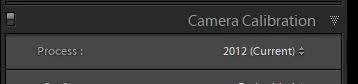
    You have reverted to an older process version. This can be changed in the calibration section of the developer module. Just change the process version to 2012. If you have images in your catalog that were originally edited in an older process version Lightroom will honor that process version. You will probably want to move them to the newer version unless there is a specific reason you want to keep those images in the previous version. In most instances you will find that the newer process version is much improved.

    1 reply

    JP Hess
    JP HessCorrect answer
    Inspiring
    May 25, 2017

    You have reverted to an older process version. This can be changed in the calibration section of the developer module. Just change the process version to 2012. If you have images in your catalog that were originally edited in an older process version Lightroom will honor that process version. You will probably want to move them to the newer version unless there is a specific reason you want to keep those images in the previous version. In most instances you will find that the newer process version is much improved.