brunor91137898
Participating Frequently
December 5, 2022
Answered

How to STOP face detection

  • December 5, 2022
  • 2 replies
  • 1479 views

Guys, please, if anyone could help. I must've pressed something accidentally that made this face detection thing come and wanting to detect over 2000 faces in my pictures. Also, all I see on the editing desk are faces. The pictures I want to work on, only appear really small on the bottom part. 

All I want is for my LR Classic to go back to normal (na face detection, and clear editions).

Appreciate the help!!
This topic has been closed for replies.
Correct answer Rob_Cullen

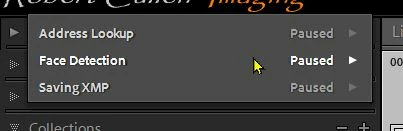
Try- 1) 'Pause' Face lookup under the Identity Plate drop-down menu-

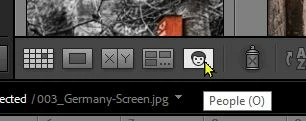
2) Show your Tool bar [T] and click on the [People] icon.  Keyboard shortcut [O]

2 replies

Rob_Cullen
Community Expert
Rob_CullenCommunity ExpertCorrect answer
Community Expert
December 5, 2022

Try- 1) 'Pause' Face lookup under the Identity Plate drop-down menu-

2) Show your Tool bar [T] and click on the [People] icon.  Keyboard shortcut [O]

Regards. My System: Windows-11, Lightroom-Classic 15.1.1, Photoshop 27.3.1, ACR 18.1.1, Lightroom 9.0, Lr-iOS 10.4.0, Bridge 16.0.2 .
brunor91137898
Participating Frequently
December 5, 2022

Thanks Rob but eventhoug I had that face detection feature paused, as you sugested, they still keep looking for faces. Isn't there a way to just turn it off DEFINITELY and get the LR back to the basics? This feature is really crappy....

Rob_Cullen
Community Expert
Community Expert
December 5, 2022

When "Paused" it is turned of DEFINITELY. 🙂   (Unless you press [O] )


My catalog is always "paused" and the only time I want faces indexed, I select a Folder and toggle on/off with keyboard [O].


Regards. My System: Windows-11, Lightroom-Classic 15.1.1, Photoshop 27.3.1, ACR 18.1.1, Lightroom 9.0, Lr-iOS 10.4.0, Bridge 16.0.2 .
Ian Lyons
Community Expert
Community Expert
December 5, 2022

You can pause Face Detection by clicking on the Identity Plate at top left corner, then choose Pause from the drop down menu.