
Participant
October 9, 2023
Question

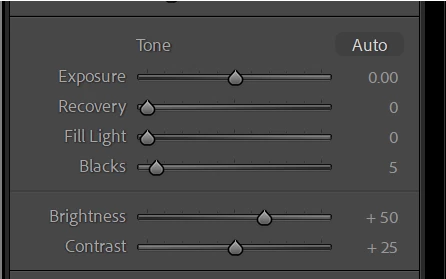
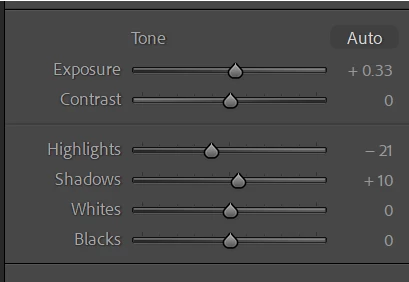
How to switch from the very old develop panel options to the current one

  • October 9, 2023
  • 3 replies
  • 176 views

Uupon importing DNG files from Topaz Phto AI for my Z8 HE* raw, I'm getting the very old develop panel options instad of the current ones.  I don't see any options to confirugit within LRC.  I can export the files to DNG, and import them back in to fix it but there's got to be a easier way to congiure it within LRC.  

OLD Develop Panel:
 

Current Develop Panel:
 

This topic has been closed for replies.

3 replies

Suzanne Mathia
Community Expert
Community Expert
October 9, 2023

update the process version In the Calibration Panel, - Click on the Process Version menu and select current version,  Switch on the 'AutoSync' option to change PV for multiple photos.I Also an old PV it will show a 'lightning bolt' under the histogram (in Develop module). Click the lightning bolt for the dialog to update PV. You can update all selected photos


.....Suzanne Mathia
Rikk Flohr_Photography
Community Manager
October 9, 2023

This is also changeable in Lightroom Classic's Calibration panel at the bottom of the Edit Stack. 

Rikk Flohr: Adobe Photography Org
Participant
October 9, 2023

Found the fix.  Selecting the files, and right clock the mouse you're presented with the command "Update to current process version."  That fixed it.