Participating Frequently
July 18, 2020
Answered

How to uninstall People View in Lightroom Classic?

  • July 18, 2020
  • 1 reply
  • 445 views

I finally get some portrait jobs again and I sit down to sort through the sessions in Lightroom Classic and Adobe has completely bleeped up the program.  I can't sort and rate photos because this horrific People View keeps popping up over grid view and requires I select faces from my ENTIRE catalog?  WTH Adobe?  If I want People View I'll select it from the menu.


I can't find a way to turn it off.  Can I uninstall this nightmare and reinstall an old version?  I can use On1 software to take care of these clients, but I haven't used it in so long I'll have relearn that.  Thanks Adobe!


This topic has been closed for replies.
Correct answer F. McLion

Hi

It's part of the application and can not be uninstalled.

However, make sure to have the automatic recognition process turned off.

Open the catalog setting and make sure that "automatically recognize faces" is not checked on.

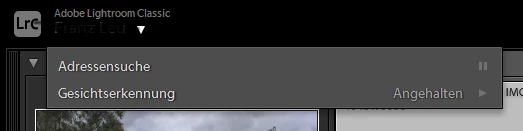
You can also turn it off here:


1 reply

F. McLion
Community Expert
F. McLionCommunity ExpertCorrect answer
Community Expert
July 19, 2020

Hi

It's part of the application and can not be uninstalled.

However, make sure to have the automatic recognition process turned off.

Open the catalog setting and make sure that "automatically recognize faces" is not checked on.

You can also turn it off here:


--- Got your issue resolved? Please label the response as 'Correct Answer' to help your fellow community members find a solution to similar problems. ---
gspam1Author
Participating Frequently
July 20, 2020

Thank you F_McLion.  Enabling that by default was pure evil on Adobe's part.