Participating Frequently
July 17, 2018
Answered

HSL format confusion

  • July 17, 2018
  • 1 reply
  • 5321 views

I have a palette of colours in the format below. Here is one of them:

PaletteHexRGBHSLColor Picker Boxes
Green#50fa7b80 250 123135° 94% 65%Green Color

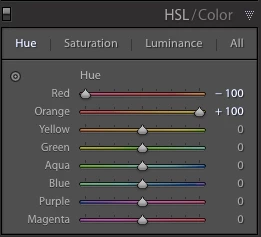
The Hue in the HSL code above is represented in degrees (135), but the Hue sliders in Lightroom run from -100 to +100:

Q1: Why does Lightroom use a different format?

Q2: How would I convert a Hue given in degrees into it's +/-100 equivalent for use in Lightroom?

Thanks

This topic has been closed for replies.
Correct answer dj_paige

Range masks are very clever, but that’s not what I need. I don’t know how else to explain what I’m trying to achieve here. Why are there two HSL formats in use, one with degrees for the Hue and the other +/- 100 for the Hue. Surely HSL should be in a standardised format across applications.


The +/- sliders are not an HSL format, they are a user interface. You can't select a HSL region to adjust, you can only select the "Green" region, however that is defined in the underlying algorithms. You can't select a HSL value to achieve, you can only select the "Green" (or other) slider and move it up or down and see if you like the results.

What I want to do to the ‘actual’ image is implied by the the tool in question – to modify the hue (green hue in this case) in the image to *exactly* match the HSL value specified in the table of my original post (135°).

Not possible in Lightroom. This is a job for Photoshop.

1 reply

Todd Shaner
Legend
July 17, 2018

The HSL controls are "fixed"color controls used to modify the Hue, Saturation, and Luminance of specific named color areas in the image. You need to explain in detail exactly what you are trying to accomplish.

HSL and color adjustments |

shotbymjpAuthor
Participating Frequently
July 17, 2018

Exactly what I’m trying to accomplish is to set the Hue slider in Lr to match the exact value of 135 degrees. I am unable to do this because the slider in Lr uses a different scale.

shotbymjpAuthor
Participating Frequently
July 17, 2018

You need to explain what you want to do to the actual image AFTER setting the control to a specific setting. For example you want to paint that color on the image, which is better accomplished using Photoshop. As explained each HSL color control hue is fixed and the -100 to +100 settings refer to the "amount" of the setting. In the case of Hue it appears the control range is about -60° at -100 and +60° at +100. If you're trying to target a specific color area in the image use the Targeted Adjustment Tool (TAT) in the upper left-hand corner. Drag it to the color area you want change and then hold down the left mouse button and drag it up or down to change the setting for that specific color area. If you're trying to do something else please explain in detail.


“You need to explain what you want to do to the actual image AFTER setting the control to a specific setting.”

What I want to do to the ‘actual’ image is implied by the the tool in question – to modify the hue (green hue in this case) in the image to *exactly* match the HSL value specified in the table of my original post (135°).

“For example you want to paint that color on the image, which is better accomplished using Photoshop.”

No, I don’t wish to paint over the image at all.

“As explained each HSL color control hue is fixed and the -100 to +100 settings refer to the "amount" of the setting. In the case of Hue it appears the control range is about -60° at -100 and +60° at +100.”

I realise that the range of each slider is fixed. If the control range is approx. -60° @ -100 and approx. +60° @ +100, as you suggest, then this equates to a range of 120°, thus I am unable to set a value of 135°. Herein lies my issue.

“If you're trying to target a specific color area in the image use the Targeted Adjustment Tool (TAT) in the upper left-hand corner. Drag it to the color area you want change and then hold down the left mouse button and drag it up or down to change the setting for that specific color area. If you're trying to do something else please explain in detail.”

Yes, I am using the targeted adjustment tool to target a green zone of the image. I’d be interested in hearing from a Lr specialist to confirm whether what I’m trying to achieve is possible.