
Participating Frequently
October 1, 2023
Question

Huge color difference in LR Develop Tab vs LR Web Tab - please help!

  • October 1, 2023
  • 2 replies
  • 1100 views

I'm reaching to hopefully get some insight to a recent problem I'm having with LR! I'll finish editing my photos in the Develop tab, switch over to the Web tab (inside LR) and the colors are incredibly off: way too saturated and orange compared to what I see when I'm in Develop. The colors I see in the Web tab of LR are much more similar to what I see in my online gallery hosting site as well as my iPhone, so I think the issue is with the Develop window. I understand there will always be slight variations in how the colors display across different programs, however, why would they be displayed SO differently in the same program?! I then have to go back into Develop and blindly desaturate until it looks acceptable in the Web tab. Any help would be greatly appreciated!!
This topic has been closed for replies.

2 replies

Community Expert
October 1, 2023

A factor only mentioned in passing it seems is the calibration of your display. If you don't calibrate your display using hardware, there might be a monitor profile installed by some driver that is corrupt. This is strangely common on windows machines. You should calibrate your display to see if it fixes things or use the test that @johnrellis lists of setting the display to sRGB. This just tests whether the monitor profile could be the problem, not whether it is. Only real solution in general is to calibrate.

Ania5D7CAuthor
Participating Frequently
October 2, 2023

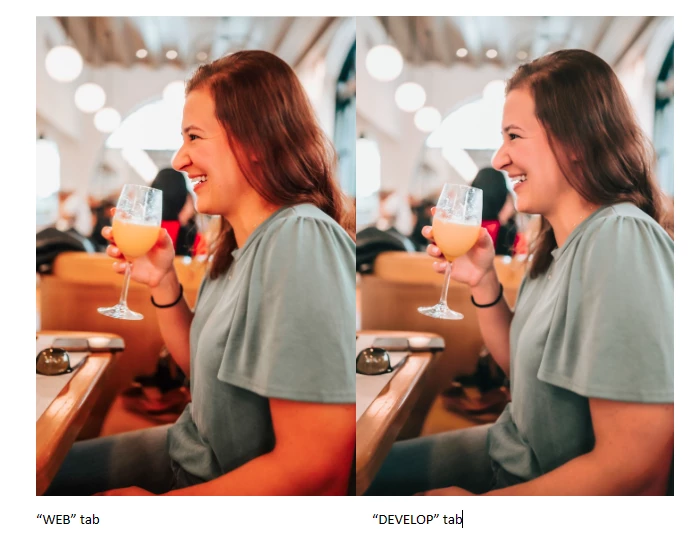
I just installed the latest driver for the graphics card and there is no difference. As for screen calibration, I don't see why/how that would help considering the colors are different within LR. I had a profile on my monitor that was calibrated but it gave blacks and greys a pink hue, and tbh I couldn't stand it and have just switched to the standard profile. Below is another example of the color difference between the two tabs in Lightroom.

Ania5D7CAuthor
Participating Frequently
October 2, 2023

I'd like to add, that the "web tab" photo is how I actually edited the photo this past June, so I believe the way the color is displaying in the web tab to be accurate. The problem is within the Develop tab.


Now: photos edited to my liking in Develop tab = overly saturated and orange in Web tab

Past photos: colors in Web tab are correct to how I edited them (in the past) = now muddy/muted in Develop tab

johnrellis
Legend
October 1, 2023

There is (or was) a long-standing bug that Adobe has never reported as fixed. The Web module uses (or used) the Chromium Embedded Framework, the web engine inside the Chrome browser.  The version of CEF it uses (or used) assume the display is sRGB, rather than using the display's assigned color profile. So if you're on a wider-gamut display (as most new ones are), the colors in the Web module will look oversaturated.


Most browsers are fully color managed these days, so if you publish the Web gallery and then view it in a color-managed browser, it should look reasonably close to what you see in Develop.


I haven't retested the bug since LR 8 in 2018 -- I think relatively few people use the Web module these days.


Please do the menu command Help > System Info and report the exact version of LR you're running.


johnrellis
Legend
October 1, 2023

Moderators, @Rikk Flohr: Photography, please hold off on merging this with the old bug:

https://community.adobe.com/t5/lightroom-classic-bugs/p-web-module-doesn-t-use-display-s-color-profile-incorrect-color-management/idi-p/12664009 


That bug is fixed on Mac and probably fixed on Windows, though I'm no longer able to test it on Windows.