New Participant
July 29, 2017
Answered

I can't enter a specific custom aspect ratio

  • July 29, 2017
  • 2 replies
  • 6296 views

I am using Lightroom, in the develop module, in the crop mode. I can switch between aspect ratios, I can enter a new one that is nothing like an existing one. But overtime I try and enter 963x831, it gives me 6.8x5.85 which is a couple of pixels off from what I am trying to get to. Every time I enter that custom number, it reverts to  the one mentioned.

    This topic has been closed for replies.
    Correct answer johnrellis

    Hmm, like @wobertc, when I enter 963 x 831 as a custom crop ratio, I get 9.63 x 8.31 (which is correct):
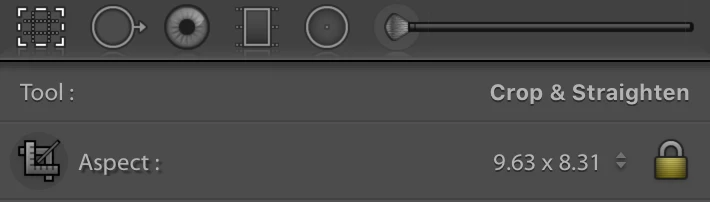
    Please do Help > System Info and report the exact version of LR.

    LR does have a long-standing bug with custom crop ratios: If you enter one that is too close to an existing built-in ratio, LR will use the built-in ratio. See this bug report in the official Adobe feedback forum: Lightroom: I can't add (certain) custom crop ratios | Photoshop Family Customer Community .  (I'm not sure this is what you're experiencing, though.)

    Most unfortunately, a senior Adobe engineer says that behavior is "by design" and can't be avoided. I have explained in that same bug report how to implement custom ratios correctly: Lightroom: I can't add (certain) custom crop ratios | Photoshop Family Customer Community .  The engineer never responded, and I doubt that Adobe will ever fix this.

    My Any Crop plugin lets you enter exact crop ratios.

    2 replies

    johnrellis
    johnrellisCorrect answer
    Legend
    July 31, 2017

    Hmm, like @wobertc, when I enter 963 x 831 as a custom crop ratio, I get 9.63 x 8.31 (which is correct):

    Please do Help > System Info and report the exact version of LR.

    LR does have a long-standing bug with custom crop ratios: If you enter one that is too close to an existing built-in ratio, LR will use the built-in ratio. See this bug report in the official Adobe feedback forum: Lightroom: I can't add (certain) custom crop ratios | Photoshop Family Customer Community .  (I'm not sure this is what you're experiencing, though.)

    Most unfortunately, a senior Adobe engineer says that behavior is "by design" and can't be avoided. I have explained in that same bug report how to implement custom ratios correctly: Lightroom: I can't add (certain) custom crop ratios | Photoshop Family Customer Community .  The engineer never responded, and I doubt that Adobe will ever fix this.

    My Any Crop plugin lets you enter exact crop ratios.

    Rob_Cullen
    Community Expert
    Community Expert
    July 31, 2017

    My Any Crop plugin lets you enter exact crop ratios.

    Magic answer- Thanks John.

    Regards. My System: Windows-11, Lightroom-Classic 15.0, Photoshop 27.0, ACR 18.0, Lightroom 9.0, Lr-iOS 10.4.0, Bridge 16.0 .
    Rob_Cullen
    Community Expert
    Community Expert
    July 29, 2017

    This is one of the vagaries of Lightroom. Because Lightroom is not a pure 'Pixel' editor, it does not "understand" a "couple of pixels" in the same way that Photoshop might.

    The numbers you enter (963x831) often get reduced to the nearest ratio that fits within Lightroom's number format. In fact I get  9.63x8.61 when I enter your figures! So cropping in Lr is all about "Ratios".

    It is in the export module that you can set a Pixel dimension, but again it is often not the exact pixels you want either, as the Export resize options can only set the dimension "Limits" for size, again not the exact H & W pixel dimensions, as you might crop in Photoshop.

    If you can match the crop ratio to an exact multiple of pixel dimensions then you may get exactly what you want from Lightroom.

    My rant probably makes no sense,  Summary- better to use Photoshop for an unusual exact pixel crop!

    Regards. My System: Windows-11, Lightroom-Classic 15.0, Photoshop 27.0, ACR 18.0, Lightroom 9.0, Lr-iOS 10.4.0, Bridge 16.0 .