Participating Frequently
December 3, 2016
Question

I can't import catalogue data from backups

  • December 3, 2016
  • 1 reply
  • 484 views

Hi there,

I've got a problem with my Lightroom 5.7.1

Due to a hardwareproblem my drive letters got los. First I don't recognize that the problems are the missing drive letters and unfortunately I don't remember them anymore. I only saw that my lightroom cataloge, used since mid of 2015, was nearly empty - only the pictures of the last two weeks were left.

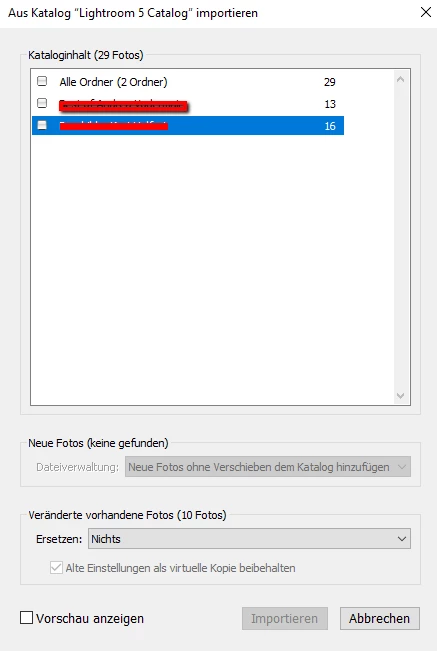
I tried to import from another catalogue to restore all older pictures. It read and read the differences betweeen the catalogues and showed me several folders with differences. But there ist no possibility to mark any of these ordners, to get the grey square infront of the folder name black, so the "Import" button on the bottom of the windows stays grey.

I can import my pictures again, but then I lose my changes, that are saved in the catalogue, so it would be much more important to get the catalogue back.

Do anyone here know any help? I urgently need my changes for working again on the pictures.

Regards
Katja

    This topic has been closed for replies.

    1 reply

    dj_paige
    Legend
    December 3, 2016

    I tried to import from another catalogue to restore all older pictures.

    Instead of importing from another catalog, you might want to try File->Open Catalog and point to the catalog with the older pictures, and see if that works. If it does, then you can try merging this catalog with the one that has only two weeks of photos.

    kka75Author
    Participating Frequently
    December 3, 2016

    Oh, many thanks for the fast answer!

    Yes I can open them all for themselves, they are allright.

    BUT: How does it work to merge them??? Would solve all my problems, I guess!!!

    If it's interesting for explaining a menu path, I work on windows.

    kka75Author
    Participating Frequently
    December 3, 2016

    I now have a new idea what I can do:

    1. Opening one of my backups.

    2. Saving each of the folders in a single new catalogue.

    Then I've got them all to use it. But not as convenient as when they all are in one catalogue. For me it only brings the advantage that I can work with former used folders.

    Afterwards I have the possibility to import all of them in a new main catalogue - if importing catalogue data does work again.