


I cannot get Lightroom to use my graphics card!! What is going on - losing my mind on this issue
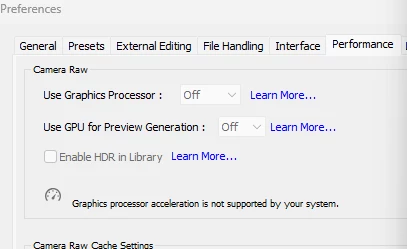
This is what I see when I go into preferences in Lightroom. It won’t let me click on the “Off” to change it to anything.
I have a NVIDIA GeForce GTX 1650 graphics card. I have used lightroom for years without problems and recently noticed it was very slow so I checked the preferences and found this.
I have tried removing “Camera Raw GPU Config.txt” from %appdata%\Adobe\CameraRaw\GPU
I have done a CLEAN INSTALL of the NVIDIA graphics card driver… TWICE!
I used “Display Driver Uninstaller (DDU)” as suggested by Gemini, to make sure I had a “clean slate” before installing the graphics card driver again
I have restarted numerous times. checked the monitor cables. now I’m working on only ONE monitor which is directly plugged into the graphics card port (not motherboard ports).
But it’s still not working. I have tonnes of work to do and so far have spent 5 hours trying to work out what is going on - please help !!
 AdChoices