

PeterO2433
Participant
June 17, 2026
Answered

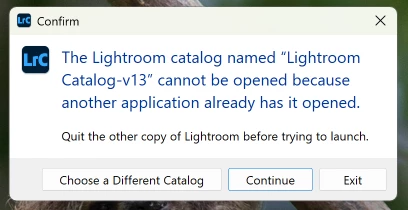
I cannot open LRC. An error message tells me another has it opened, but I have exited from my other laptop.
  • June 17, 2026
  • 2 replies
  • 0 views

This error message appears when I try to open LRC. The version I have is 15.3.1. I have exited LRC on my other laptop. I’ve also tried to uninstall LRC but it isn’t doing so. Any suggestions, please?
    Correct answer Per Berntsen

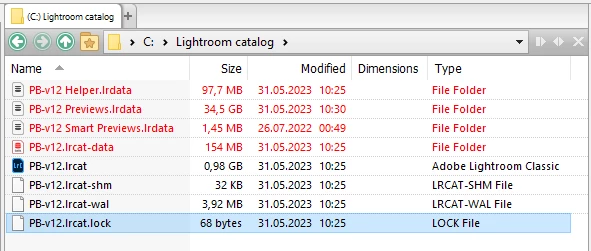
    When LrC is running, a lock file prevents other users from accessing the catalog.
    The lock file is normally deleted when you close LrC, but if it crashes, or isn’t closed properly, the lock file may not be deleted, so you have to delete it manually.

    Using the File explorer, go to the folder that contains your catalog.
    Delete the file that has the same name as your catalog and a .lock extension. (do not delete anything else)
    Now launch LrC.


    2 replies

    PeterO2433
    Participant
    June 17, 2026

    Thank you very much. Up and running now. Much appreciated

    Per Berntsen
    Community Expert
    Per BerntsenCommunity ExpertCorrect answer
    Community Expert
    June 17, 2026

    When LrC is running, a lock file prevents other users from accessing the catalog.
    The lock file is normally deleted when you close LrC, but if it crashes, or isn’t closed properly, the lock file may not be deleted, so you have to delete it manually.

    Using the File explorer, go to the folder that contains your catalog.
    Delete the file that has the same name as your catalog and a .lock extension. (do not delete anything else)
    Now launch LrC.