Participant
July 9, 2018
Answered

I did something wrong with my LR catalogs- help please?

  • July 9, 2018
  • 1 reply
  • 398 views

HI-

I really need help with my Lightroom catalogs.

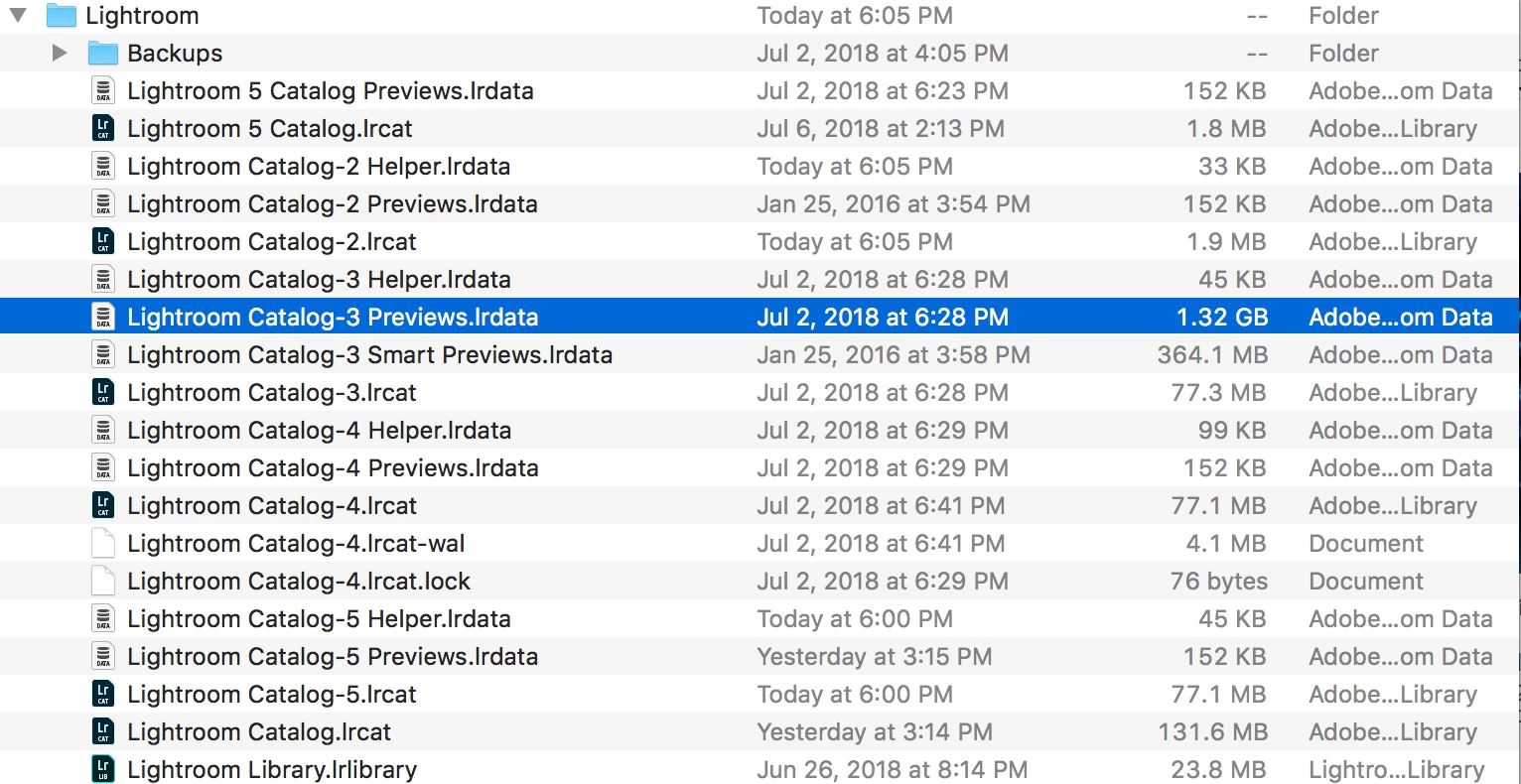
When I open my catalog options, I have a few versions- and I though I only had one. see screen shot below of what I have.

I also see that there are separate files for smart previews and previews- and I do not understand how this all works- could it be part of my problem? I tried to undersatnd it via tutorials and I do not get it. I was jsut doing what i was told to do in turoials and checked the smart preview box? i really can not remember. It has been a long time.

I was assuming that the largest version of my catalog was the most recent one but it is not.

I have used LR Classic to open the catalogs and none of them are correct.

I was working with about 9k photos - most in raw format

I have never had this problem before and I am very confused as to what I did.

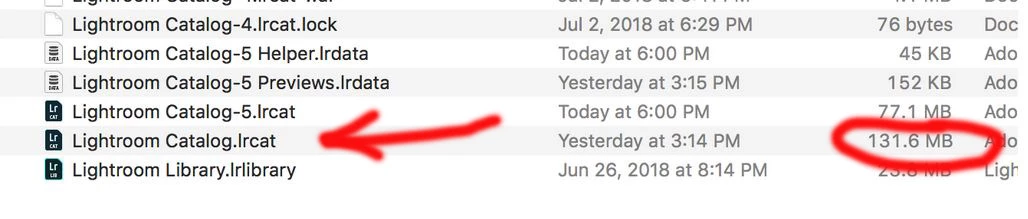
My largest catalog of 131mb has about 6k images, which is 3k photos short- and the organization into collections is gone.

I thought I was using Lightroom classic, but now I see that I still have LR 5 on my computer. I did not know this and I wonder if I was using it by accident? I do not think I was, since the catalog I see for LR5 is small.

can someone help me figure out what I might have done?

The line I have highlighted in blue is 1.32gb- maybe this is where my latest work is stored?

but i though everything was in one catalog and not in a preview folder?

Maybe I did not understand how to use previews and smart previews correctly?

Here is a screen shot of the files on my computer
Help please! I am seriously stuck and do not want to loose all my work.

Thank you.
    This topic has been closed for replies.
    Correct answer Rob_Cullen

    For consideration-

    Catalogs are all of the file-type  .LRCAT  You only need to 'look at'  these types of files.

    Catalogs will always be accompanied by a 'file' of the Previews :  Catalog Name.LRDATA

    The 'File Name' of a catalog does not always suggest the Lightroom version.  eg.  LR-5.LRCAT  could be a Classic catalog for v7.4

    When you upgrade Lightroom (eg v5>v6,   or v6>Classic7 ) Lightroom adds a number suffix to the catalog name.

    eg. Catalog.LRCAT  becomes Catalog-2.LRCAT

    If you upgrade an 'old' catalog multiple times you will get catalogs with increasing suffix number.  -2 -3 -4 -5, etc.  So do not keep opening an 'old' Lightroom-5 catalog. It appears you have been doing this.

    The mB size of a Catalog.LRCAT file does not indicate the content or "latest" version. Recent versions of LR-Classic compress the catalog more aggressively.  "highlighted in blue is 1.32gb"  is NOT the catalog!- it is a Preview cache-  ignore.

    You 'largest' catalog appears to be this one in the screen-clip, BUT - only YOU can determine which of the .LRCAT files contains all your photo data. (as the MB size does not tell!)

    So if you open a catalog and it asks to "upgrade" do not, Just exit and move that Catalog out of your working folder to another location.

    I also note you may be using this drive for Backups. You should specify another physical drive location for Catalog backups.

    1 reply

    ssaintdonAuthor
    Participant
    July 9, 2018

    UPdate- I just saw in my time machine back ups on my mac that i was only using LR 5- i can see a LR 5 cataolg and some folders that i assume go with it somehow.

    so this is part of the problem.

    I opened my catalog in LR Classic.

    Which I thought was OK.

    Tx- Sharon

    Rob_Cullen
    Community Expert
    Rob_CullenCommunity ExpertCorrect answer
    Community Expert
    July 9, 2018

    For consideration-

    Catalogs are all of the file-type  .LRCAT  You only need to 'look at'  these types of files.

    Catalogs will always be accompanied by a 'file' of the Previews :  Catalog Name.LRDATA

    The 'File Name' of a catalog does not always suggest the Lightroom version.  eg.  LR-5.LRCAT  could be a Classic catalog for v7.4

    When you upgrade Lightroom (eg v5>v6,   or v6>Classic7 ) Lightroom adds a number suffix to the catalog name.

    eg. Catalog.LRCAT  becomes Catalog-2.LRCAT

    If you upgrade an 'old' catalog multiple times you will get catalogs with increasing suffix number.  -2 -3 -4 -5, etc.  So do not keep opening an 'old' Lightroom-5 catalog. It appears you have been doing this.

    The mB size of a Catalog.LRCAT file does not indicate the content or "latest" version. Recent versions of LR-Classic compress the catalog more aggressively.  "highlighted in blue is 1.32gb"  is NOT the catalog!- it is a Preview cache-  ignore.

    You 'largest' catalog appears to be this one in the screen-clip, BUT - only YOU can determine which of the .LRCAT files contains all your photo data. (as the MB size does not tell!)

    So if you open a catalog and it asks to "upgrade" do not, Just exit and move that Catalog out of your working folder to another location.

    I also note you may be using this drive for Backups. You should specify another physical drive location for Catalog backups.

    Regards. My System: Windows-11, Lightroom-Classic 15.3, Photoshop 27.5, ACR 18.3, Lightroom 9.3, Lr-iOS 10.4.0, Bridge 16.0.3 .