

bgrosz
Inspiring
June 7, 2025
Answered

I got a new laptop and need to move my lightroom files.

  • June 7, 2025
  • 1 reply
  • 301 views

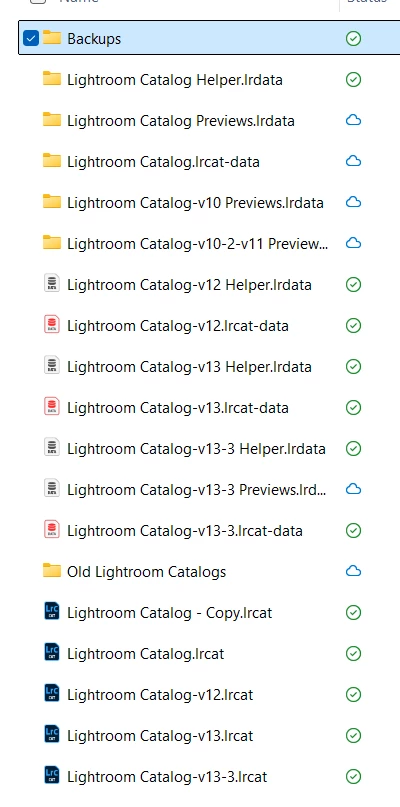
I got a new laptop and I have Lightroom loaded.  I want to copy all of my presets over to the new laptop.  I don't really care if any of the photos come so that photo catalog isn't that important.    These are all the files under my lightroom folder.  I have no idea what to save to import onto the new laptop.  I use lightroom for basic editing but an not a full time photographer and instead do design work for my company so having access to those original files isn't necessary.  The edited files are there so that's good as long as I can get some of my old presets, etc.
Correct answer AxelMatt

Here you'll find a good article about the move to a new computer:

https://www.lightroomqueen.com/how-move-lightroom-to-new-computer/


1 reply

AxelMatt
Community Expert
AxelMattCommunity ExpertCorrect answer
Community Expert
June 7, 2025

Here you'll find a good article about the move to a new computer:

https://www.lightroomqueen.com/how-move-lightroom-to-new-computer/


My System: Intel i7-8700K - 64GB RAM - NVidia Geforce RTX 3060 - Windows 11 Pro 25H2 -- LR-Classic 15 - Photoshop 27 - Nik Collection 8 - PureRAW 6 - Topaz Photo AI
dj_paige
Legend
June 7, 2025

@AxelMatt has provided the best link to follow.


There is also a free e-book at LightroomQueen.com, which provides even more detail. And it's free!


The biggest mistake some people make is that they either don't follow the directions given, they skip a step*, or change a step, or they add in their own steps. Please follow the directions exactly as written.


* — there is one step you can skip if it doesn't apply, where it describes moving Mac to Windows or Windows to Mac