
Participant
May 21, 2022
Question

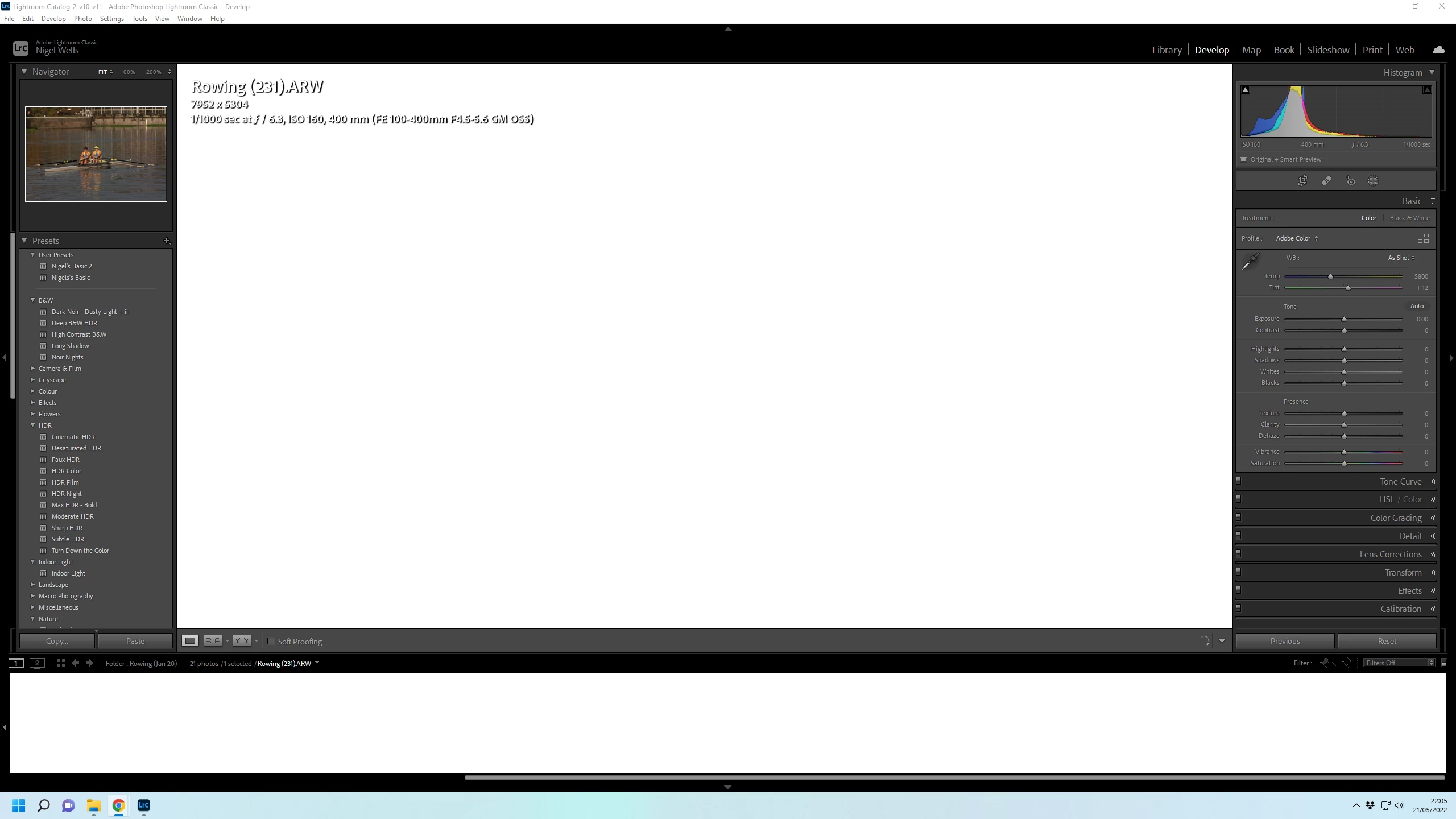
I keep geeting White screens in Lightroom

  • May 21, 2022
  • 2 replies
  • 119 views

If I leave Lightroom running and my computer goes to sleep, on wakeup this is what I get.  Lightroom "loses" the image I was working on and replaces it and the slide bar with a blank white screen.  Only solution is to quit from lightroom and restart.  The also sometime happens when I just working on an image, it will freeze for a few seconds and then the image is lost.
 

This topic has been closed for replies.

2 replies

F. McLion
Community Expert
Community Expert
May 22, 2022

Additional question:

Is GPU support turned on? Did you try if it makes a difference if you turn it off?

https://helpx.adobe.com/lightroom-classic/kb/lightroom-gpu-faq.html


--- Got your issue resolved? Please label the response as 'Correct Answer' to help your fellow community members find a solution to similar problems. ---
F. McLion
Community Expert
Community Expert
May 22, 2022

Did you let it go sleep while in Develop module?

On which storage/disk are your photos stored? Internal drive?

--- Got your issue resolved? Please label the response as 'Correct Answer' to help your fellow community members find a solution to similar problems. ---