Participant
August 30, 2026
Question

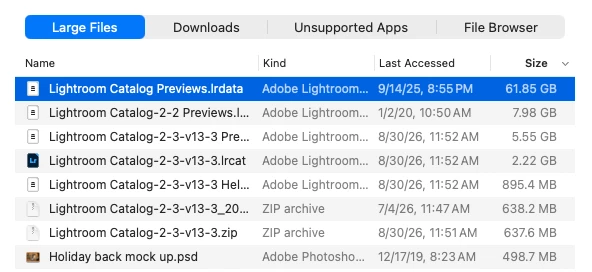
I"m trying to free up space on my laptop. The backup I just did is so much smaller than the 9/14/25 file that I’m hesitant to delete that file but it’s taking up SOOOOOOOO much space!

  • August 30, 2026
  • 2 replies
  • 33 views


    2 replies

    dj_paige
    Legend
    August 30, 2026

    You can get rid of the first two files, as these appear to be previews of previous catalogs. That first row is not a catalog nor is it a backup of a catalog.

    If you are low on space in your laptop, one possibility is to move the photo files to an external drive. That ought to clear up a lot more space.

    IMPORTANT ADVICE: backups of your catalog file should NOT be stored on the same disk as the working catalog. Why? Because if you hard disk fails (and it will someday), then you don’t have your working catalog and you don’t have a backup either. That leaves you with zero copies of your catalog file, and I will guess that you won’t be happy with that. So you should MOVE the backups (the .zip files) to a different hard disk or SSD. No, let me re-phrase that: you MUST move the backups to a different hard disk or SSD.


    Califdan2
    Inspiring
    August 30, 2026

    You are not showing us your catalog backups.  This screen shot looks like your actual active catalog.  The  2.22gb file (4th from top) is the actual catalog.  one with an extension of “.lrcat-data” is also a critical file related to the catalog.  Those are the only 2 that are included in the ‘on exit’ backup process.

    The two zip files MAY be catalog backups, but they are from 8/30 and 7/4 of this year which doesn’t match the text in your post, and they are virtually the same size. 

    So, more info needed.   Open LrC and go to “Catalog Settings”.  then look at the “Backups” tab and the first line will show you where your ‘on exit’ catalog backups are being saved for this catalog.