

timspix-us
Participant
June 19, 2026
Question

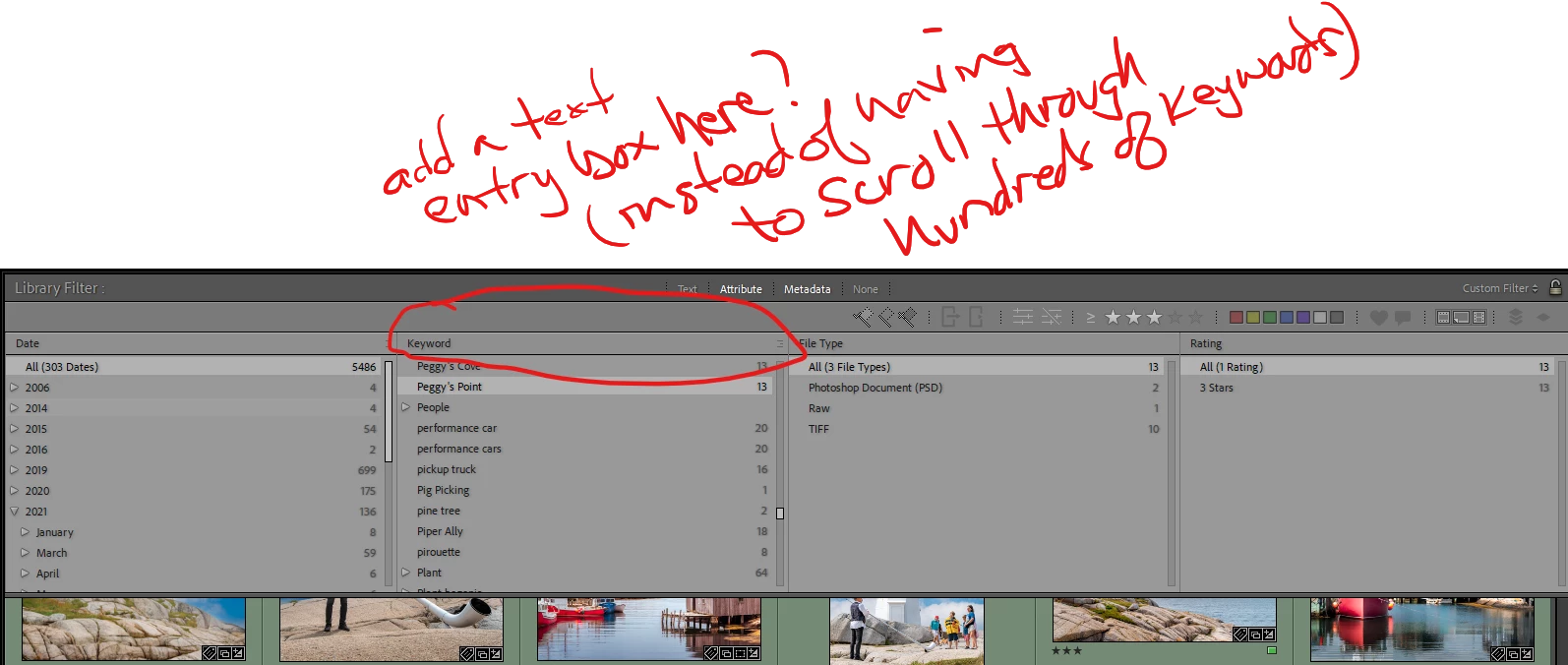
I think that instead of having to SCROLL through my long list of keywords it would be super helpful to be able to have a search box within library metadata tab

  • June 19, 2026
  • 3 replies
  • 19 views

When searching my library I often use the metadata KEYWORD drop-down.  Instead of having to scroll through hundreds of keywords, it would be super helpful to have a text box into which I could type the keyword instead of scrolling.  Also, as an added bonus - have the feature begin preloading options from the list as the typing progresses.
 

    3 replies

    dj_paige
    Legend
    June 20, 2026

    Thanks, ​@johnrellis for that clarification. I should have added that myself, but sometimes I am guilty of thinking that everyone knows about the right-arrow.

    johnrellis
    Legend
    June 20, 2026

    Building on ​@dj_paige’s reply, hover the mouse over a keyword in the Keyword List panel and a right-arrow will magically appear to the right of the keyword. Click that right-arrow to filter by that keyword.

    dj_paige
    Legend
    June 19, 2026

    There is a “Filter Keywords” box in the Keyword List panel. You can type the keyword there, select the desired keyword in that panel and it will show up selected in the Filter Bar.