
gary_sc
Community Expert
Community Expert
February 18, 2019
Answered

I wish to copy a subset of my catalog with all keywords, etc.

  • February 18, 2019
  • 1 reply
  • 528 views

I have almost 50,000 images in my catalog but wish to save out a new catalog from my catalog but keep everything that I already have intact.

Let me explain, I have about 1500 family images from the early 20th century to present of family members. I want to export all of these family photos into a new catalog to give to my sister so she has a copy. She'll be starting a Photoshop/Lightroom Classic membership to access these images and the information.

I want this exported catalog to maintain all of the keywords (mostly family names and locations).

However, I also do not wish to lose my copy of these photos and information. If I click OK to the following screenshot, will this simply copy the images and create a new catalog or will it move the images to the new catalog? Also, I have the images grouped into 11 folders of family groups. Will the folder structure be maintained?

So, before I click OK on the attached screenshot (from File -> Export as Catalog), what boxes should be checked so that I get what I want?
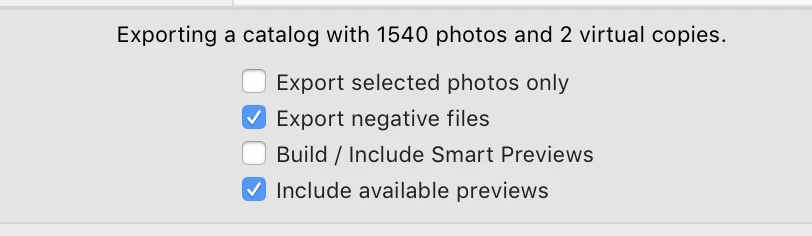
Thanks for any help you can provide, I just want to know ahead of time what contingencies to expect so that I can prepare and work with and/or around them.

    This topic has been closed for replies.
    Correct answer Ian Lyons

    Gary,

    The setup you show above will do as you require. The Export Negative files and Include Previews mean that the new catalog will include copies of the photos and associated previews. The keywords and any other metadata assigned to the photos are/is also included as are any collections you might have setup. Your existing catalog, previews and photo library will remain intact.

    1 reply

    Ian Lyons
    Community Expert
    Ian LyonsCommunity ExpertCorrect answer
    Community Expert
    February 18, 2019

    Gary,

    The setup you show above will do as you require. The Export Negative files and Include Previews mean that the new catalog will include copies of the photos and associated previews. The keywords and any other metadata assigned to the photos are/is also included as are any collections you might have setup. Your existing catalog, previews and photo library will remain intact.

    gary_sc
    Community Expert
    gary_scCommunity ExpertAuthor
    Community Expert
    February 18, 2019

    Hi Ian,

    Thanks for helping, been using LR for years but have not done this before and am proceeding with caution.

    So the "Export Negative files" is another way of saying "copy the original images." Got it. That was the one thing that had me scratching my head.

    My one concern, and I guess I'll have to test this, is will the folder structure be maintained. If not I'll add keywords to the photos so they can be easily dropped into new folders.

    Thanks Ian.

    gary_sc
    Community Expert
    gary_scCommunity ExpertAuthor
    Community Expert
    February 18, 2019

    After quick test, folder structure is maintained. Thanks!