Participant
July 3, 2026
Answered

Ich kann in Classic 15.4.1 (MAC) die Aufnahmezeit nicht mehr im Stapel ändern!!?? Kann mir jemand helfen?

  • July 3, 2026
  • 4 replies
  • 54 views

Im Fenster “Aufnahmezeit ändern” fehlt die Option “für alle ändern”

    Correct answer Anshul_Saini

    Hello ​@tlw,

    Thanks for reaching out. dj_paige already mentioned the key steps: checking multi-selection and resetting preferences. If that doesn’t help, here are some additional approaches:
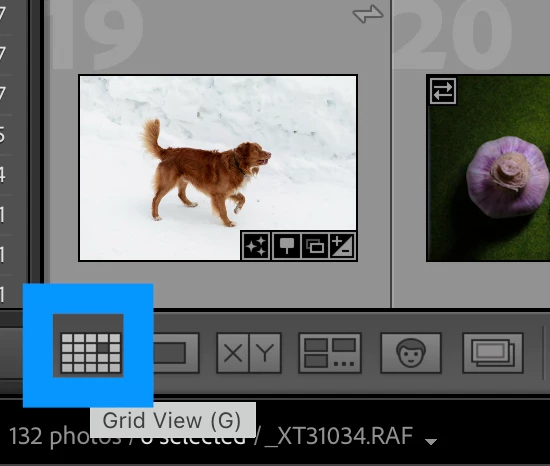
    • It seems you are in Loupe view. Please switch to Grid View (press G) in the Library module. Select multiple photos again (for example, Cmd+A within the folder, or Shift-click to select a range of photos).
      Then go to Metadata > Edit Capture Time and check whether “Change All” appears.


    • Test with a new catalog: Create a new, empty catalog (File > New Catalog), import a few test photos, select all, and try "Edit Capture Time" again. If "Change All" works there, the issue lies with the existing catalog.

    Try these and let us know. It would help narrow down the problem further.

    Best,

    Anshul Saini

    4 replies

    dj_paige
    Legend
    July 3, 2026


    @tlw 

     Please mark the reply from ​@Anshul_Saini correct, not my reply.

    JohanElzenga
    Community Expert
    Community Expert
    July 3, 2026

    You have selected 1225 photos. I vaguely remember that batch edits like this are limited to 1000 photos. Try selecting half of them.

    -- Johan W. Elzenga
    tlwAuthor
    Participant
    July 3, 2026

    Thanks for your answer, but the number of selected photos is not of belong. I was successful by changing to “grid layout”, then the button “to all” appeared :). Thomas

    JohanElzenga
    Community Expert
    Community Expert
    July 3, 2026

    Yes, it was so obvious. I’m ashamed that I did not realize you weren’t in grid mode.

    -- Johan W. Elzenga
    Anshul_Saini
    Community Manager
    Anshul_SainiCommunity ManagerCorrect answer
    Community Manager
    July 3, 2026

    Hello ​@tlw,

    Thanks for reaching out. dj_paige already mentioned the key steps: checking multi-selection and resetting preferences. If that doesn’t help, here are some additional approaches:

    • It seems you are in Loupe view. Please switch to Grid View (press G) in the Library module. Select multiple photos again (for example, Cmd+A within the folder, or Shift-click to select a range of photos).
      Then go to Metadata > Edit Capture Time and check whether “Change All” appears.


    • Test with a new catalog: Create a new, empty catalog (File > New Catalog), import a few test photos, select all, and try "Edit Capture Time" again. If "Change All" works there, the issue lies with the existing catalog.

    Try these and let us know. It would help narrow down the problem further.

    Best,

    Anshul Saini

    dj_paige
    Legend
    July 3, 2026


    • It seems you are in Loupe view. Please switch to Grid View (press G) in the Library module. Select multiple photos again (for example, Cmd+A within the folder, or Shift-click to select a range of photos).
      Then go to Metadata > Edit Capture Time and check whether “Change All” appears.


    Yes, that’s the solution.

    dj_paige
    Legend
    July 3, 2026

    If you have selected only one photo in the Library Module, then Change All will not appear, only Change will appear. If you have selected more than one photo, then Change All appears.


    So the question is, have you selected more than one photo?

    tlwAuthor
    Participant
    July 3, 2026

    Yes, I have all Fotos from a direction selected. Thanks for your answer. But how I try, the option will not appear

    … see my screenshot

    dj_paige
    Legend
    July 3, 2026