

Martin Albrecht
Participant
August 5, 2024
Answered

Identification of pictures that are not in a collection

  • August 5, 2024
  • 2 replies
  • 453 views

I have a very big catalogue, and basically all my pictures should be in at least one collection. But sometimes I forget to make an assignment after import, and then it is quite difficult to identify these pictures later. Also copies that are created by editing in external apps are not automatically assigned to a collection even if the original picture was assigned.

It would be a perfect solution to create a smart collection for these cases, but I still could not figure out, if/how it is possible to create such a smart collection.
This topic has been closed for replies.
Correct answer richardplondon

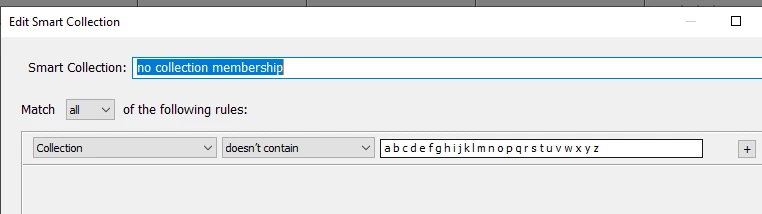
here's one method - assuming every collection's name would include at least one letter of the alphabet

hth

2 replies

GoldingD
Legend
August 6, 2024

Not sure just now on the smart collection. But if you are looking to see what photos are not in a collection, then select all the collections, selecting all the photos in the collections, then click on All Photographs ) or a parent folder with the option to show photos in subfolders on) . Those not selected are not in a collection. Then click on /Edit/Invert Selection/


JohanElzenga
Community Expert
Community Expert
August 6, 2024
quote

Not sure just now on the smart collection. But if you are looking to see what photos are not in a collection, then select all the collections, selecting all the photos in the collections, then click on All Photographs ) or a parent folder with the option to show photos in subfolders on) . Those not selected are not in a collection. Then click on /Edit/Invert Selection/


By @GoldingD


There is normally no need to use this rather cumbersome method. The smart collection works fine, and if you have collections that are not caught with it, then just include all letters of the alphabet and all numbers from 0 to 9. The big advantage of using a smart collection for this kind of thing is that the smart collection is constantly updated. You don't have to do anything, just look at the number of pictures in it. If that is not zero, then there is an image that needs attention. I have several of these kinds of "needs to be zero" smart collections. Do note however that this only works for normal collections, not if you want to include smart collections as well. In that case, your method is probably required.


-- Johan W. Elzenga
richardplondonCommunity ExpertCorrect answer
Community Expert
August 5, 2024

here's one method - assuming every collection's name would include at least one letter of the alphabet

hth

Martin Albrecht
Participant
August 5, 2024

Thank you very much, it worked!