


Participant
August 30, 2026
Question

Il filtro radiale non funziona. non c'è una tendina dedicata, per cui se tento di modificare l'esposizione la modifica in tutta la foto e non solo all'interno della zona selezionata, e se do il comando inverti non cambia nulla

  • August 30, 2026
  • 2 replies
  • 21 views

Seleziono filtro radiale. Compare l’ovale di modifica. Ma non c’è un elenco di effetti su cui agire, per es. regola esposizione, per modificare la zona dell’ovale., che quindi non serve a nulla

    2 replies

    Per Berntsen
    Community Expert
    Community Expert
    August 31, 2026

    The radial filter isn’t working. There isn’t a dedicated dropdown, so if I try to adjust the exposure it changes the entire photo and not just within the selected area, and if I use the invert command nothing changes.


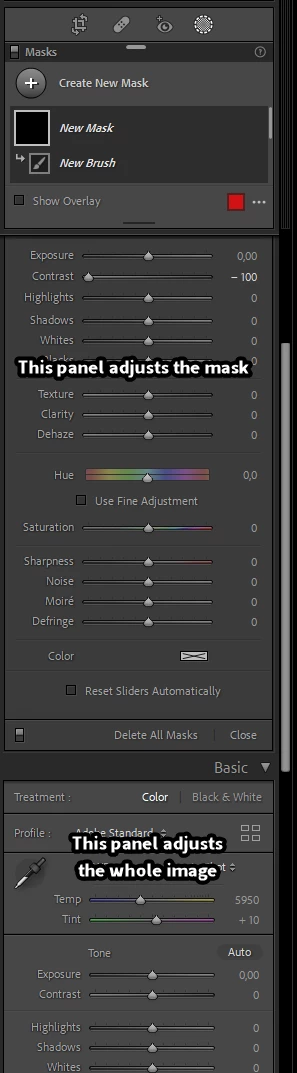
    The panel for editing the whole image is still available when you do masking, and will appear below the panel for editing the mask.
    Sounds like you need to scroll up to see the panel for mask editing, which is a little darker than the standard panels.


    Califdan2
    Inspiring
    August 30, 2026

    Odd. 

    First of all if you actually see an “Invert” button, then that rules out you being in the Basic Panel rather than the Mask Adjustments panels.  

    So, if moving a slider such as exposure changes the entire image my guess is that the masked area of your image is the entire image.   You can check this but turning on the “overlay” (Letter “o” on the keyuboard or checking the “Show Overlay” checkbox) and picking an intense un-natural color for the overlay.  If the entire image gets that color overlay then your mask includes the entire image


    If that isn’t it,  please send screen shot showing the “masks” panel and the “masks adjustments” panel as in my screen shot.