



sarkara1
Known Participant
March 12, 2020
Answered

Image appears corrupted in LR but not in PS

  • March 12, 2020
  • 2 replies
  • 1332 views

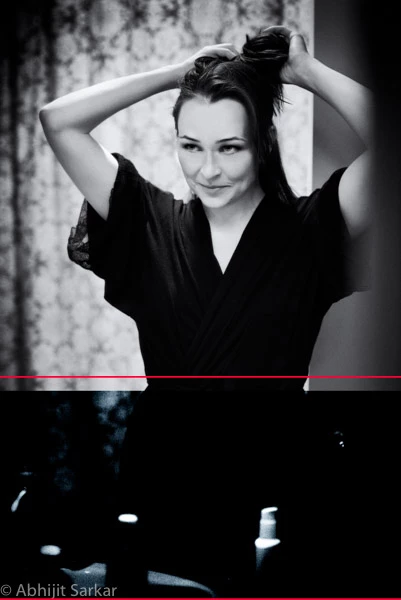
I've an image shot on Nikon D750 that I did some work on in LR, and then moved to PS. When done, the saved image appears with a dark rectangular banding in LR but not in PS. I recreated the catalog by discarding all previews, and removed-reimported the image multiple times without any avail.

See the area marked a red rectangle below.

This topic has been closed for replies.
Correct answer johnrellis

Are there layers in the TIFF file that have feathered layer masks?  If so, there is a bug in PS 21.0 and 21.1 that incorrectly renders the final image as seen by LR and other apps (PS displays the image correctly). To work around the bug, in PS enable the option Preferences > Performance > Legacy Compositing. 


See this bug report:

https://feedback.photoshop.com/photoshop_family/topics/reproducible-bug-in-feathered-layer-masks-photoshop-lr-classic?topic-reply-list%5Bsettings%5D%5Bfilter_by%5D=all


Please add your constructive opinion to the bug report, and be sure to click Me Too and Follow in the upper-right corner. That will make it a little more likely that Adobe will prioritize a fix, and you'll be notified when the bug's status changes.


[Use the reply button under the first post to ensure replies sort properly.]

2 replies

johnrellis
johnrellisCorrect answer
Legend
March 13, 2020

Are there layers in the TIFF file that have feathered layer masks?  If so, there is a bug in PS 21.0 and 21.1 that incorrectly renders the final image as seen by LR and other apps (PS displays the image correctly). To work around the bug, in PS enable the option Preferences > Performance > Legacy Compositing. 


See this bug report:

https://feedback.photoshop.com/photoshop_family/topics/reproducible-bug-in-feathered-layer-masks-photoshop-lr-classic?topic-reply-list%5Bsettings%5D%5Bfilter_by%5D=all


Please add your constructive opinion to the bug report, and be sure to click Me Too and Follow in the upper-right corner. That will make it a little more likely that Adobe will prioritize a fix, and you'll be notified when the bug's status changes.


[Use the reply button under the first post to ensure replies sort properly.]

sarkara1
sarkara1Author
Known Participant
March 14, 2020

Thank you, reverting to "Legacy Compositing" did fix my problem. I'll add details to the bug report in a few hours.

Tony_See
Inspiring
March 12, 2020

Would you mind posting a link to the raw Nikon file (if thats what you were working on in Photoshop)?

Are you using the workflow from LR to Photoshop anf then letting that process add the image back to the LR Catalog?

And please post your LR and OS versions thanks.


sarkara1
sarkara1Author
Known Participant
March 12, 2020

@Tony_See

Are you using the workflow from LR to Photoshop anf then letting that process add the image back to the LR Catalog?


Yes. The "External Editing" setting for PS 2020 is as follows:
File Format: TIFF
Color Space: ProPhoto RGB

Bit Depth: 16 bits/component

Resolution: 300

Compression: ZIP


> Would you mind posting a link to the raw Nikon file


The image after processing in PS is saved as a TIFF file in LR. Is that what you're asking for, or the original NEF file? 


> post your LR and OS versions

 LR Classic 9.2, macOS 10.15.3

Just Shoot Me
Legend
March 12, 2020

No Tony is asking for a LINK to the Original RAW file that was sent to PS and was returned as a TIF.

So there was/IS an original file that you Sent To PS (Edit In: PS 2020 or whatever). It is that original file we are asking for.

Although posting both would not hurt so we can see both.


You can do that to any of the online storage places like Dropbox or even to your Adobe ID Creative Cloud file system.
