
Participant
March 26, 2020
Answered

Image looks highly oversharpened in Develop module, but correctly in the details preview box

  • March 26, 2020
  • 5 replies
  • 3377 views

Dear fellow Lightroom users,

I have suddenly come across a problem in Lightroom with the images looking way oversharpened in the Develop module.

This problem definitely just emerged in the last two weeks since I last edited a photo, it was all fine before.

Just for clarification, I use both a Panasonic MFT camera as well as a Sony A7 and I only shoot RAW images. Problems occur on all images from both cameras. There are no presets or other settings applied on import.


In the library view, all my pictures look perfectly fine. As soon as I switch to Develop mode, the image displayed in 1:1 ratio looks highly oversharpened, as if I would have upped the setting from 40 (default) to 80 or higher.

But in the small preview window within the "details" toolbox, the image shows the correct amount of sharpening.

To clarify, the image looks less sharp in the details box then in the main develop window. If I switch back to library, the image again looks correctly sharpened. Exported images are also fine.


Does anyone have an idea what could be the reason for this?


Thank you very much for taking the time to read this.

Greetings, Jan-Hendrik
 

This topic has been closed for replies.
Correct answer Per Berntsen

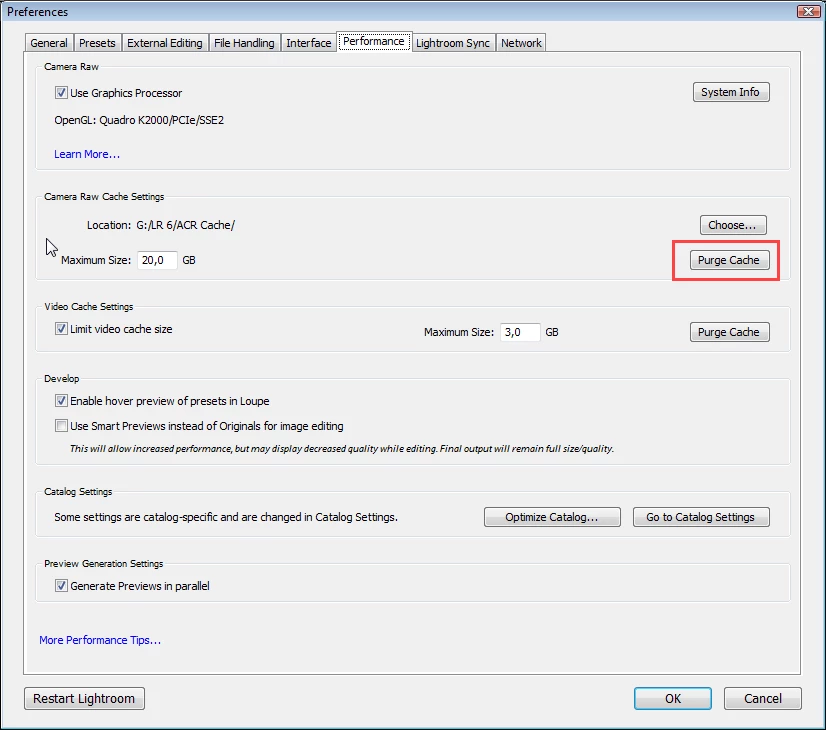
Your develop previews might be corrupted.

Try purging the Camera raw cache, which will delete them.

This is done in Preferences > Performance.


5 replies

kureev
Participant
September 8, 2023

Ok so I've had the exact same issue with photos in Develop module looking oversharpened, whereas in Library everything looked normal. Purging cache did not help. Someone here suggested also turning off the GPU Acceleration, which helps, but you lose the GPU Acceleration, so it's not a very good solution either.


So, what I managed to find out is that in my case it was the Radeon Software that was causisng the oversharpening in Develop Module. I have a laptop with Ryzen 5 4600H with integrated AMD GPU, and Radeon Software has a feature in Settings named Radeon Image Sharpening. I turned this feature off and then the sharpening in Lightroom came back to normal in all modules.


Hope this helps someone.

Participant
November 1, 2024

Thank you very much, turning off Radeon Image Sharpening worked. Develop mode is back to normal.

TheDigitalDog
Inspiring
May 10, 2021

Images that look too 'grainy' in Develop is a known bug that will be fixed soon. 

Author “Color Management for Photographers" & "Photoshop CC Color Management/pluralsight"
David Sutphin
Participating Frequently
May 10, 2021

They are not too grainy. They are oversharpened in the develop module. I attached samples in my message. That is sharpening, not grain!


Per Berntsen
Community Expert
Per BerntsenCommunity ExpertCorrect answer
Community Expert
March 28, 2020

Your develop previews might be corrupted.

Try purging the Camera raw cache, which will delete them.

This is done in Preferences > Performance.


Participant
March 28, 2020

Thank you very much, that did the trick!

Now that Lightroom has to recreate all previews, the images look just fine.


Per Berntsen
Community Expert
Community Expert
March 27, 2020

You say that the image displays correctly in Library. Is this at 1:1?

If you compare Library and Develop at 1:1, what do you see?

Participant
March 28, 2020

Yes, I mean the 1:1 view. In Library, the 1:1 image looks "correct", meaning the sharpness is according the the image settings. In Develop, the 1:1 view is highly oversharpened while in the little viewing box of the Details tool, the part of the image visible is displayed with the correct amount of sharpness.

Per Berntsen
Community Expert
Community Expert
March 26, 2020
Participant
March 27, 2020

Sadly this did not help. Images in the Develop module are still looking oversharpened while being just fine in all other views.

Thank you for the tip.


Greetings,

Jan-Hendrik