
FW071919
Participant
February 20, 2021
Answered

Images exporting small file size

  • February 20, 2021
  • 4 replies
  • 2756 views

Hi!  I am shooting in raw on a 5D Mark IV and my RAW files are 35 mb but for some reason they're exporting at 1 mb.  I have checked to make sure the export DPI is 300 and 100% original but as a JPEG.  Can anyone suggest what I'm doing wrong to get good full resolution files exported?
This topic has been closed for replies.
Correct answer Per Berntsen

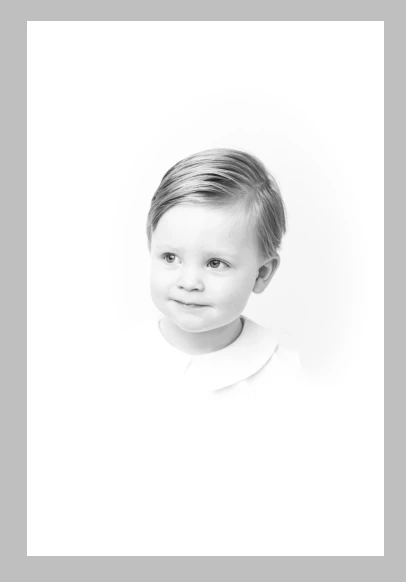
The image being black and white (actually it's desaturated RGB) contributes to the small file size because all three channels are identical.

But the important factor here is the large white areas that compress to almost nothing, as well as the child's smooth skin, that is also slightly out of focus.

All these factors combined makes it possible to have a 2852 x 4278 image with a file size of 1 MB.


4 replies

Participant
August 16, 2021

I am having the same issue with the same camera. Did you by chance figure it out cause I am about to the replace the camera. It's been happening for a 1yr now. 

Community Expert
August 16, 2021

Other things being equal, provided the image content shows THAT you want - and AS you want - achieving a small JPG filesize is a positive benefit, and not a problem.


A JPG certainly could be artificially bulked-out so far as its file size by adding back in artifical noisiness (grain) and/or by suppressing all noise reduction in the Raw conversion; but this will likely not be to its advantage, in pictorial terms. 

Participant
September 30, 2021

Hey Richard, for years I output Jpegs from Raw in both low res for online and high res for print. On average the high res always come out about 29mb. I recently updated Lightroom Classic and now weirdly all my high res files are coming out about 4.6mb.  

For my High Res my output is 100 and I just don't tick the Image sizing box. Any clue on what could of changed?

Conrad_C
Community Expert
Community Expert
February 20, 2021

@FW071919 wrote:

Can anyone suggest what I'm doing wrong to get good full resolution files exported?


File size is never a reliable way to evaluate resolution. The second you change file formats, 6720 x 4480 pixels can be a much larger or much smaller file size, depending on how the new format works and what export settings you chose. If your 1MB JPEG export still has 6720 x 4480 pixels, then you got the full resolution out of it. But…


…just having the full resolution doesn’t mean you got full quality, because resolution alone is not a reliable way to measure image quality! Image quality depends on resolution + bit depth + quality of exposure + quality of processing in software (color correction, sharpening) + appropriate export settings that preserve all of the above in the chosen export format. If you get them all right, then a 1MB JPEG might look pretty good.


Be sure to remember two of the points made above:

  • File size is not a reliable way to measure image resolution.
  • Image resolution is not a reliable way to measure visual image quality.
FW071919
FW071919Author
Participant
February 25, 2021

Thank you for your response!  I apologize I didn't reply sooner.  I thought no one responded but turns out it was going to my spam messages.  I believe the issue I was having is little data in my photo as it is black and white and not much data

Per Berntsen
Community Expert
Community Expert
February 20, 2021

There are three things that affect the file size of a jpg.

  • Pixel dimensions
  • Quality setting
  • Image content. Flat, smooth, unsharp content = small file. Sharp, detailed, noisy content = large file.


As pointed out by @DS256 , the ppi value is irrelevant for file size,

The 5D Mark IV produces images that are 6720 x 4480 pixels.

What are the pixel dimensions of the exported jpgs?

Would you mind posting one of these 1 MB files here?

Do not attach the file, use the Insert Photos button in the toolbar.


FW071919
FW071919Author
Participant
February 25, 2021

I believe I have figured out the reason for the small file size is there isn't as much data in a black and white photo

Per Berntsen
Community Expert
Per BerntsenCommunity ExpertCorrect answer
Community Expert
February 25, 2021

The image being black and white (actually it's desaturated RGB) contributes to the small file size because all three channels are identical.

But the important factor here is the large white areas that compress to almost nothing, as well as the child's smooth skin, that is also slightly out of focus.

All these factors combined makes it possible to have a 2852 x 4278 image with a file size of 1 MB.


Inspiring
February 20, 2021

I'm not sure you have a problem.


First, the RAW file is not an image but just the sensor data. It has to be converted internally by LR into an image. Having said that, the resulting export size will be dependant on and cropping you've done, file type and export settings (e.g. resizing)


For example, one of my 6000x4000 pixel RAW NEF files is 29.7MB. When I export this as a JPG, no resizing, and 100% quality, the resulting 6000x4000 pixel JPG file is 21.5MB.


If I export it as a TIFF, with no compression, the 6000x4000 TIF is 137MB.


The DPI is misleading as it only comes into effect if you have selected a physical dimension like inches or CM's. If you are dealing in pixel's, it's ignored. For example, exporting the images as an 10x8 inch picture at 300DPI results in a 3000x2000 pixel JPG of 5.89MB.


FW071919
FW071919Author
Participant
February 25, 2021

Thank you for your response!  I apologize I didn't reply sooner.  I thought no one responded but turns out it was going to my spam messages.  I have copied these settings, specifically the resolution.  I believe the issue I was having is little data in my photo as it is black and white.