fotomatt21239347
Participating Frequently
December 26, 2025
Answered

Images not showing.

  • December 26, 2025
  • 1 reply
  • 259 views

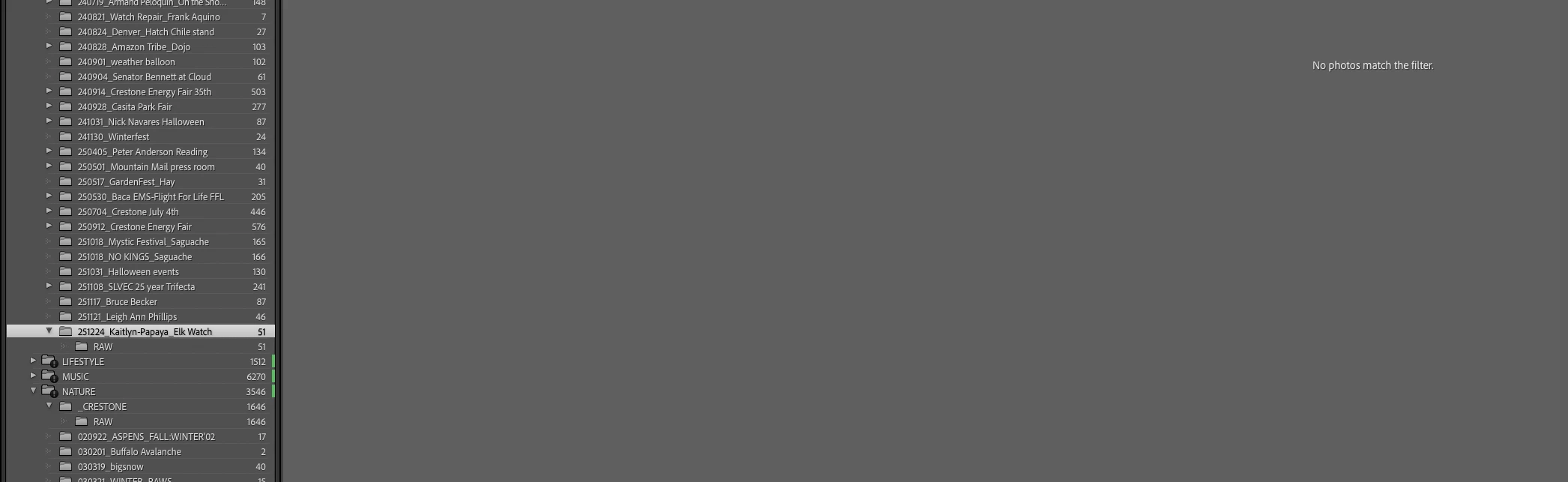
I just upgraded to 15.1 and updated my catalog. I did some shooting, edited the photos, etc. I needed to lighten one image and when I clicked on the folder I saw this. Then I started clicking on other folders. Nothing. I verified the photos still reside in these folders but LRC suddenly stopped showing. 


What gives? 
871689i1BF5EF19B3EF8460.png

Correct answer Rob_Cullen

871708i3DE547A1327924A0.jpg  So what Filter options have you set?  

If you don't see the filter bar above- press backslash key  [ \\ ] -  Click on [None] to clear filters.


1 reply

Rob_Cullen
Community Expert
Rob_CullenCommunity ExpertCorrect answer
Community Expert
December 26, 2025

871708i3DE547A1327924A0.jpg  So what Filter options have you set?  

If you don't see the filter bar above- press backslash key  [ \\ ] -  Click on [None] to clear filters.


Regards. My System: Windows-11, Lightroom-Classic 15.4.1, Photoshop 27.8, ACR 18.4, Lightroom 9.4, Lr-iOS 10.4.0, Bridge 16.0.3 .
fotomatt21239347
Participating Frequently
December 27, 2025

Thank you! That did it. Much appreciated Rob! 

From somewhere on Colorado's Continental Divide...~ fotomattlinktr.ee/fotomatt