Participant
September 21, 2018
Answered

Import D850 star rating on images

  • September 21, 2018
  • 2 replies
  • 1333 views

Hi all,

Is there a way to make LR import the star rating I set on photographs on the Nikon D850? I can import the photos with the star rating on other software but LR seems to ignore it. Or is this another case of Adobe thinking we should do things their way 😕😕 (Sorry Adobe, we love you really - sometimes ) - I'm hoping it's just a setting and I'm a total Muppet for not finding it.

Cheers all,

Terry
This topic has been closed for replies.
Correct answer johnrellis

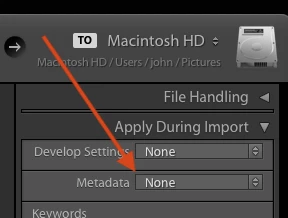
1. In the Import window, make sure Apply During Import > Metadata is set to None:

Then try importing a never-before-imported photo. Does the problem still occur?  If not, you may have been using an Import Metadata preset that was clearing or setting the rating.

2. If that doesn't help, upload a never-before-imported photo that's been rated in-camera to Dropbox or similar, and post the sharing link here. That will help us identify the problem. Google shows some people reporting that the D850's star ratings don't import into LR, but they're not necessarily reliable.

2 replies

johnrellis
johnrellisCorrect answer
Legend
September 21, 2018

1. In the Import window, make sure Apply During Import > Metadata is set to None:

Then try importing a never-before-imported photo. Does the problem still occur?  If not, you may have been using an Import Metadata preset that was clearing or setting the rating.

2. If that doesn't help, upload a never-before-imported photo that's been rated in-camera to Dropbox or similar, and post the sharing link here. That will help us identify the problem. Google shows some people reporting that the D850's star ratings don't import into LR, but they're not necessarily reliable.

Participant
September 23, 2018

Thanks for that. I had a metadata import set which added copyright to all the import files and that set overwrote most of the settings. Yay, thank you for taking the time to help me solve this; appreciate it.

johnrellis
Legend
September 23, 2018

Glad you got it resolved.

Akash Sharma
Legend
September 21, 2018

Hi Terry,

Lightroom imports the metadata from the XMP files associated with the images you import. If your camera is saving them in a globalized format then Lightroom should be able to import them. You may use ExifTool to check how your Camera is saving the "rating" field.

Thanks,

Akash