Answered
Import into a specific folder: LR Classic on Mac
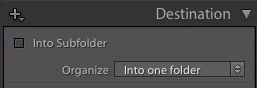
When I import images from a card to a specific folder on my hard drive, the Mac version of LR puts them in Year>DateCaptured folder inside the specific folder and not simply into the folder I specified (as I can do on my PC).
Currently: NewShoots>2018>4-22> new images
I want : NewShoots> new images
There must be a check box or two I am missing in the Mac LR?..... iMac Pro, High Sierra
Any help would be appreciated.
MJ
 AdChoices