Import Issue: Missing External Drive Folder in Photoshop
I'm currently using Lightroom Classic 11.4.1 on macOS Big Sur 11.6.7.
I use an external hard drive to store older photos since my laptop's hard drive isn't large enough to store all my photos.
I had some issues when I was trying to import photos from my external hard drive to my Lightroom master folder (which is on my laptop hard drive). I tried to fix it but did something wrong.
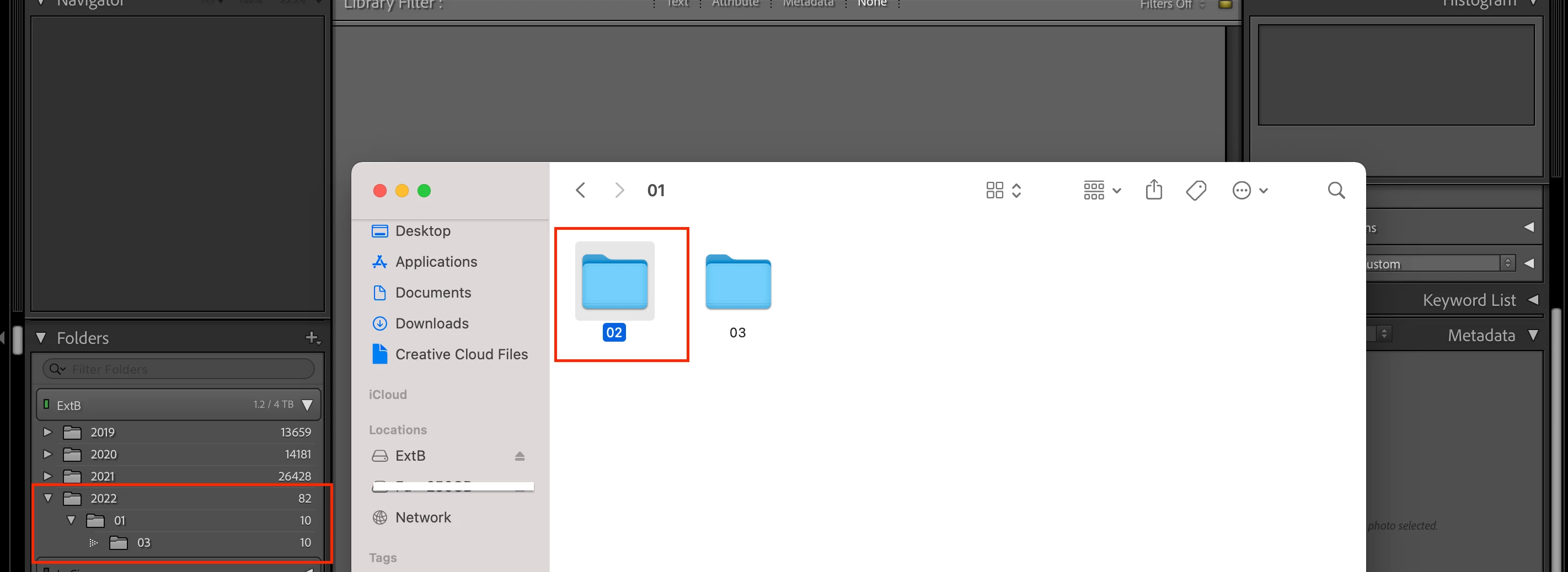
There's a folder called "02" that's in my external hard drive that I'm trying to have appear in my Lightroom catalog. The folders would remain in my external hard drive vs. my laptop hard drive, but I want them to show up in Lightroom when I have my external hard drive plugged in.
My external hard drive is called "ExtB". As you can see in the attached photo, the folders I've circled in red in Lightroom have the parent folder "01" and a subfolder named "03". But it won't let me import "02" from my external hard drive.
I've tried the "Import to this Folder" and "Synchronize" options, but the photos in the folder I'm trying to reimport are grayed out and says "This appears to be a duplicate of another photo already in your catalog." Except, I can't find those photos in my Lightroom catalog.
I know I'm not doing a good job explaining this. Let me know what additional information you need to help me reimport the "02" folder.
Thank you so much!
 AdChoices