
![Sean H [Seattle branch]](https://uploads-us-west-2.insided.com/adobedme-en/icon/422626i8FB7B6B8FDDED6B4.jpg)
Question
Import locks the UI up
UPDATE: Lr does actually lock up and stops importing as verified by the read/write LED on my card reader. When the CPU hits 200% and the app says "not responding" the LED stops flashing (not transferring).
________
I'm seeing an issue that's been plaguing me for about 2 years. When I go to import files, LR pegs two cores and beachballs my mac. The files are importing as normal it's just that the UI totally locks up. Mid-import, the UI is released and I can interact with the import but this is a brief moment before the import locks the UI again.
- 2022 Mac Studio
- 20-core Ultra - 48-core GPU
- 128GB RAM
- 2TB internal SSD (56% full)
- 32" LG 32EP950 + 27" LG 27MU67 screens
- MacOS Ventura 13.3 but has been happening for Ventura <13.3
- Lightroom Classice 12.2.1 but happening on versions previous to this
- I use various SD cards from a pool of 12. All are 64GB varieties of SanDisk Extreme Pro (95MB/s, 170Mb/s) and Lexar UHC-II and UHC-I. I've been using these for seveal years and not an issue until recent LR versions
- I'm using a Lexar SD card reader a backside TB4 port using USB adapter, but the same issue happens when I use the built-in SD card reader on the front of the Mac Studio.
The import speed doesn't seem to be impacted. It's just that the UI totally locks up and beachballs.
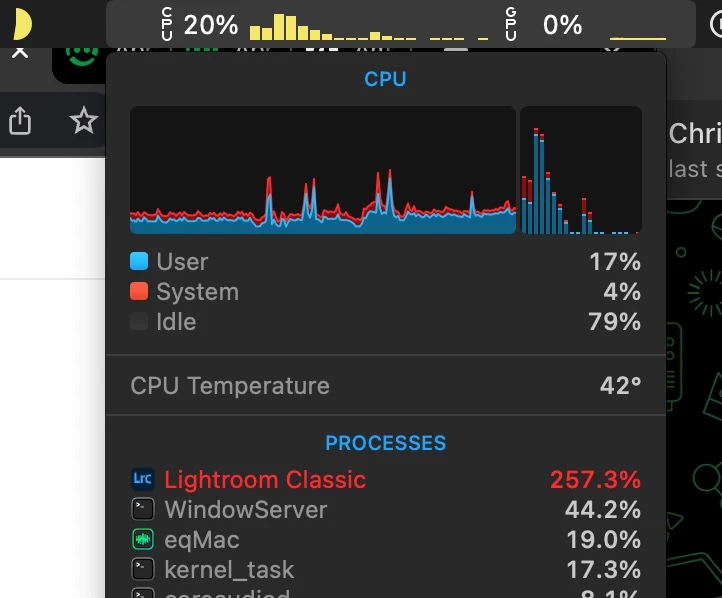
red = not responding


 AdChoices