
Participant
October 30, 2022
Question

Import Section missing from File Menu

  • October 30, 2022
  • 1 reply
  • 206 views

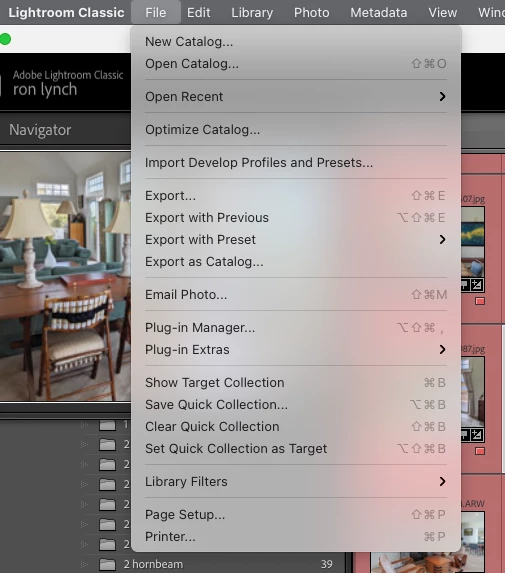
I upgraded to lightroom classic v12 on Mac 11.5.2 which results with no import option in file menu. I allowed LR to convert my catalog to the new version. LR opens but the File... menu has no Import Photos and Videos... line. IOW LR has stopped me from importing anything.
This topic has been closed for replies.

1 reply

johnrellis
Legend
October 30, 2022

That's a new one.  


1. Do you have an Import button in the lower-left corner of Library?


2. Try resetting LR's preferences:
https://www.lightroomqueen.com/articles-page/how-do-i-reset-lightrooms-preferences/


LR sometimes soils its preferences file, and resetting it can fix all sorts of wonky behavior. That article explains how to restore the old preferences if resetting doesn't help.