
Inspiring
October 1, 2017
Answered

Importation de photos à partir d'une caméra. Je ne vois pas les JPG seulement RAW.

  • October 1, 2017
  • 2 replies
  • 321 views

Bonjour,

Voici mon problème:

Je prends des photos en RAW et JPG en basse compression. Lorsque que j'importe les photos à partir de ma caméra par USB, seules les photos RAW apparaissent dans LIghtroom.

Merci pour votre aide.

LGdeR, Québec, QC Canada
    This topic has been closed for replies.
    Correct answer johnrellis

    I take pictures in RAW and JPG in low compression. When that I import pictures from my camera by USB, only the RAW photos appear in LIghtroom.

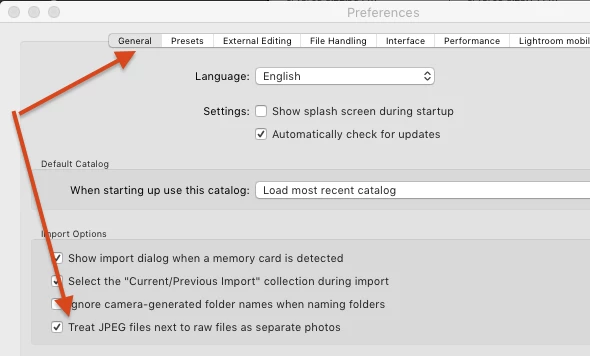
    Make sure the option Preferences > General > Treat JPEG Files Next To Raw Files As Separate Photos is checked:

    If that option was previously unchecked, then for raw files that have already been imported into the catalog, select their folder in the Folders panel on the left hand side, right-click and do Synchronize Folder.  That will import the JPEG files.

    2 replies

    LGdeRAuthor
    Inspiring
    October 2, 2017

    Thank you. Your help is appreciated.

    johnrellis
    johnrellisCorrect answer
    Legend
    October 2, 2017

    I take pictures in RAW and JPG in low compression. When that I import pictures from my camera by USB, only the RAW photos appear in LIghtroom.

    Make sure the option Preferences > General > Treat JPEG Files Next To Raw Files As Separate Photos is checked:

    If that option was previously unchecked, then for raw files that have already been imported into the catalog, select their folder in the Folders panel on the left hand side, right-click and do Synchronize Folder.  That will import the JPEG files.