
Participating Frequently
June 20, 2024
Question

Importing error / failure in LRC 13.3.1.

  • June 20, 2024
  • 3 replies
  • 655 views

URGENT HELP / SUPPORT NEEDED


Im Having the same issues with RAW files (.ARW).


My work flow includes me dragging from Photomechanic (as I shoot a lot of sports, and I set my Metadata there), and I see the failure / Error message (pic below) when hitting the import button in LRC .
As a work around, I moved the selection of raw images in to a seperate folder, and tried to import from there... and faced the same issue. 
Im not quite convinced that the files have been corrupted as I can see the photos through other applications (PS, Photo Mechanic, and even lightroom itself, however it just seems to error out on the import.
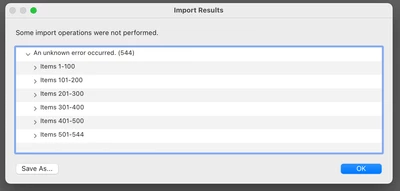


Computer Setup:
Macbook Pro 16" 2023, M2 Max, 96gb RAM, MAC-oS: 14.5
Camera's: Sony A1, Sony A7iv


[Moved from ‘Bugs’ to ‘Discussions’ by moderator, according to forum rules. A ‘bug’ is not just another word for a problem with software.]

This topic has been closed for replies.

3 replies

Participating Frequently
July 2, 2024

I have the EXACT same problem. And it seems absurd. I've changed around the raw settings on my a74 camera, but normally, all of them will import. But now: NO preview, and no import. I get the same error page as you. The files are not corrupted, they import into Photoshop fine, and even LR (the online version)


I have a modern win11 thinkpad with no other issues.

However I see that LRC is version 11.3.1 and camera raw is version 14.3. Could this be the issue?

Did you solve yours?


Cheers.

dj_paige
Legend
July 2, 2024

Please provide the information requested above. Also, do you mean Sony A7 IV ?

Participating Frequently
July 2, 2024

I don't know which information, but no, no copy during import at least. 'Yes, Sony a74 means Sony a7iv'.

Turns out I had an old version of LRC with an old version of Camera Raw too (as I stated above, I realized). I updated this one manually, and now it works 🙂
But I thought Adobe's Creative Cloud's updating system would keep me updated, but it sure didn't. So anyone else have this problem, go manually to ACC and look for lates LRC version and see if that helps.

THX.

Participating Frequently
June 20, 2024

Hi,

Are you importing with COPY or MOVE or ADD or Copy as DNG? - I have tried all four as a test and got the same error box back. I also changed where the destination folder is stored, and then tried all four, and got the same error box...


The link: https://drive.google.com/drive/folders/1Y3M6e2HnM4uShHhlvmTNrtRl2KB3K5h9?usp=drive_link


I have also included the .xmp file as well as another file from an additional event for you to check (if needed). 


Thanks in advance!

A

dj_paige
Legend
June 20, 2024

Thanks. When I get home I will take a look at it.

dj_paige
Legend
June 20, 2024

These two photos iimport into LrC 13.3.1 properly on my Windows 11 computer.


Just a guess ... take the punctuation out of the file names (except leave the dot in front of ARW) and see if you can import it with the different names. Also, try putting one or two of the photos on your Mac's desktop and try importing from there.

dj_paige
Legend
June 20, 2024

Are you importing with COPY or MOVE or ADD or Copy as DNG?


Can you post one of these image files on DropBox or similar (and share the link with us) so we can take a look at it?