Participating Frequently
February 1, 2023
Answered

Importing from card, LR Classic

  • February 1, 2023
  • 6 replies
  • 818 views

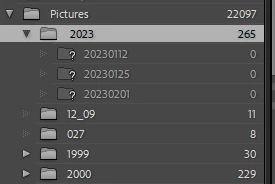
I use Lightroom Classic on Windows 11.  I import to to Pictures/2023 and to a subfolder of the day of import.  Usually works fine.  For this year I created a 2023 folder in LR, and have imported 3 times this year.  Each time LR pulls the photos into 2023 folder, shows the day of import but says it can't find it.  When I use the find the folder dialogue it want's to merge with an existing folder without results.  Windows file manager shows the file structures just fine with the photos where they are supposed to be. What am I doing wrong?
 

This topic has been closed for replies.
Correct answer Jim Wilde

I misled you when I did the window screen shot.  When I imported 20203 was highlighted.  What I'm wondering is if I made some error setting up the new folder for 2023....It should be at the bottom of the list under 2022 ..right?  If I delete the whole 2023 and more or less existing subfolders in LR, and re - import them maybe that will fix this?  I would follow the system you outlined above.  What do you think?


Looking again at your screenshot, it seems that there might be a space in front of the 2023 folder name, which might indeed explain some of the funny goings on. If you haven't yet started doing any work on those 265 images, then yes, removing that " 2023" folder (which will remove the images and those three sub-folders), then starting again with a fresh import should indeed resolve the problems.

6 replies

GoldingD
Legend
February 1, 2023

Oh, your last reply, for some reason had me relook at that apparent Windows File Explorer look of the folder structure in question:


Should not, 2023 come well after 2002, (normally)?


/followup/ I think Jim Wilde is point on, in folder name, space before 2023

GoldingD
Legend
February 1, 2023

In your first screen capture, those ? marks, odd:


I was wondering if that indicated missing folders. Not a thing on the web about ? mark in import destination. So I ran a simple test on my test catalog. In LrC, I created a folder, no pics, just the folder. As such LrC knew about it. Looked in the import screen, and yes, it shows up. Closed LrC, renamed that folder, restarted LrC,  went back to import screen. Hmm and no ? mark, and folder appearing as renamed. So lrC did not depend upon the catalog to know about the folder, just relied on the OS File Management??


So not a missing folder ??


Sounds more like an OS problem, perhaps hard drive problem.

GoldingD
Legend
February 1, 2023

In your last screen capture, in the destination, I cam curious about the "New Volume" text. Does drive D and drive E have that as part of the drive description?


Those D and E Drives:


  1. If external are they allowed to go asleep, to go into power savings?
  2. Do they have drive letters permanently assigned?
  3. Is drive E trying to die?
Participating Frequently
February 1, 2023

Hi Golding.  Both those drives are internal and yes that is part of their designations.  When I set up the computer a few years ago I was a bit timid in Windows disk manager and just went with those designations.  I may get crazy someday and give them a more useful name.  But E drive seems to run fine, no error messages.  

Participating Frequently
February 1, 2023

Wow, thank you both for such quick replies!

Jim, you are correct that is the cumulative total of imported photos for 2023.  I'm attaching a new screenshot of the import dialogue I used. In library view LR shows the contents of 2023 without ? mark.  But its certain there are no photos in the subfolders.  DJ, I import directly from the camera without removing the card from the camera. This is odd has I think I'm following the same pattern I've done for years.  But I've been known to space out before...


dj_paige
Legend
February 1, 2023

The question mark icons on the folders are gone in your most recent screen captures.


Nevertheless, it is clear that my possible explanation (above) doesn't apply here.

Participating Frequently
February 1, 2023

Hi DJ    The screen shot is of the import dialogue box.  The dreaded ? shows up in the library panel. Thank you for pondering on this.

dj_paige
Legend
February 1, 2023

A possibilty that you have accidentally used ADD to import the photos from a camera card, and when the camera card is no longer available to the computer (you have put it back in the camera), LrC thinks the folder is missing.

Jim Wilde
Community Expert
Community Expert
February 1, 2023

Can you post a screenshot of the import dialog, showing the Destination panel.


Also a screenshot of the 2023 folder as shown in File Explorer.


The screenshot you posted shows there are 265 images in that 2023 folder, which I assume are the collective images from those three imports? Do they show an exclamation mark in the top right corner of the grid thumbails (which would indicate that LrC thinks they are missing)?