
Participant
January 8, 2017
Answered

Importing photos from Lightroom to Instagram using a Plug-In.

  • January 8, 2017
  • 3 replies
  • 2176 views

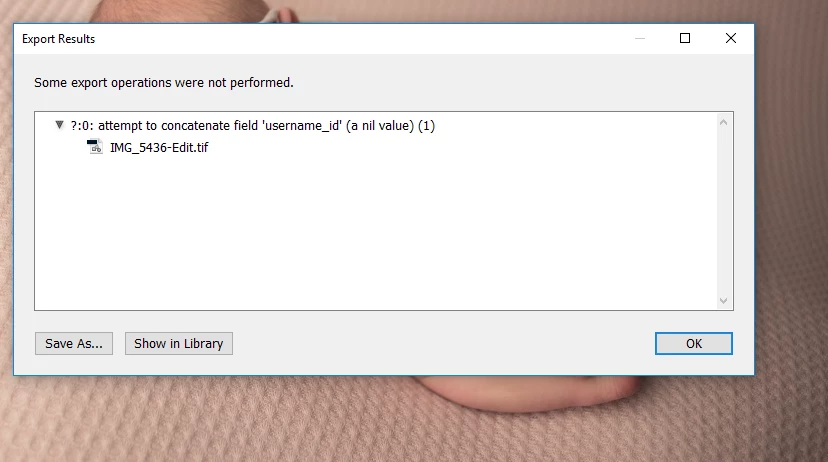
Hi!  I need some help. I found this link LR/Instagram - Lightroom Publish Plugin for Instagram  for a plug-in for IG.  Although, it's not working. I'm not sure what I'm doing wrong.  Here is a screenshot of the error I get. Can anyone help me with this?  I've been trying to work on this all day! Thank you! 
    This topic has been closed for replies.
    Correct answer 5Hands

    Thank you Kent, I finally heard back from the author/creator of the plug-in and I had to log in and log out of instagram via the plug-in and it worked.  Thanks everyone for trying to help!!  

    3 replies

    gordonf58076497
    Participant
    August 18, 2017

    I have the same app but all of a sudden Lightroom will not upload it says unable to login what is going on nothing works no reply from adobe or app

    photoyogi
    Participating Frequently
    September 11, 2017

    I have had same problem   and I see the answer was " author/creator of the plug-in and I had to log in and log out of instagram via the plug-in and it worked." but I do not see how to log in and out of instagram VIA the plug in . It used to work prior to my paying $10 to register ...odd. today I finally solved problem  by the route below , but I really want to use LR publish ideally.

      Safari

    On Safari, it's easy. Go to Safari > Preferences > Advanced. Check the box at the very bottom that says, "Show Develop menu in menu bar."

    Now open a private browsing window. Head to Develop > User Agent > Safari -- iOS 10 -- iPhone. Go to Instagram.com, sign in and click the camera button at the bottom of the screen to upload a photo from your desktop.

    kentmcpherson
    Inspiring
    January 9, 2017

    Can you post a screenshot of the settings page for the plugin? Maybe there is something there.

    5HandsAuthorCorrect answer
    Participant
    January 9, 2017

    Thank you Kent, I finally heard back from the author/creator of the plug-in and I had to log in and log out of instagram via the plug-in and it worked.  Thanks everyone for trying to help!!  

    dj_paige
    Legend
    January 8, 2017

    I would contact the author first.

    5HandsAuthor
    Participant
    January 8, 2017

    When you say to contact the author do you mean the Plug-in Creator?  If so, I did and they respond very slowly and I still haven't really gotten an answer so I thought I'd check here because I'm lost.  He gave me a new plug-in to upload and I did that and now get this error message.

    ManiacJoe
    Inspiring
    January 8, 2017

    Yes, contact the plug-in creator. He is the only one who can explain the error and correct it.