


Importing - Pictures Going to Wrong Folder
Please help. I have been using Lightroom for about 1 year and I am not up on all the verbage so please be paitent if I am wordy. When I imported pictures they have shown up as a year-month-day in the tree. Recently they have shown in a year folder, with the year/month/day as a subfolder. I needed to process some so I didn't have time to figure out the issue. I have tried importing multiple times and they want to all go into the 2025 folder. Now I discovered the other 2025 pictures I previously processes I cannot access. The folder says their is ~3000 photos, but the below subfolder do not add up to this value. It does appear to be adding all the 2025 pictures even if not a subfolder.
1 - How do I move all the folder into a year format?
2 - How to I access the "missing" photos
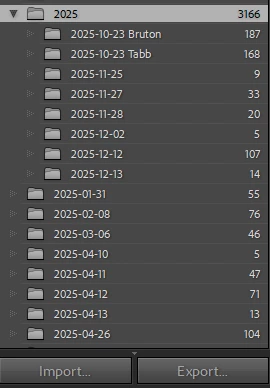
I I click on 2025-01-31 I get a message that states "no photos in selected folder" though it says there is 55, but they are not visisble in the 2025 folder either. Any help would be appreciated. Thanks
 AdChoices