Participant
September 16, 2018
Answered

Importing some photos in black and white

  • September 16, 2018
  • 4 replies
  • 5402 views

I just did a lightroom CC update and some of my photos are importing in black and white and some in color.  Why can't I get them all to import in color

    This topic has been closed for replies.
    Correct answer johnrellis

    Two things to check:

    1. When you import, in the Import window make sure that Apply During Import > Develop Settings is set to None:
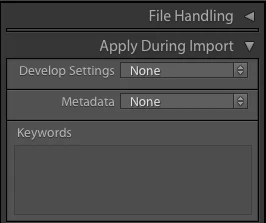
    You may have accidentally applied a preset when you imported the photos.

    2. Select one of the imported black-and-white photos, go to Develop, do the menu command Develop > Set Default Settings, and click the button Restore Adobe Default Settings.  (You may have accidentally set the default develop settings to black-and-white.) Then try importing again.

    4 replies

    Participant
    September 17, 2018

    I have the same problem from yesterday cc classic lightroom, with an image backup from the disk, all automatically change to black and white. In the develop panel, automatically in treatments is black & white and the camera profile changes to vivid c2. What do I have and where wrong when importing?

    JohanElzenga
    Community Expert
    Community Expert
    September 17, 2018

    Read the answer of John R Ellis.

    -- Johan W. Elzenga
    Rob_Cullen
    Community Expert
    Community Expert
    September 17, 2018

    Also a camera set for RAW+JPG photos, and set to "Monochrome",  will produce Color RAWs and B&W JPGs in Lightroom.

    Regards. My System: Windows-11, Lightroom-Classic 15.1.1, Photoshop 27.3.1, ACR 18.1.1, Lightroom 9.0, Lr-iOS 10.4.0, Bridge 16.0.2 .
    MarekMularczyk
    Community Expert
    Community Expert
    September 17, 2018

    Are you saying that when you import images, you're getting the same import in colour and black and white?

    That's odd.

    As johnrellis mentioned, you could be applying a develop preset to images (accidentally) but then all of the images would be black and white or colour, not some of them.

    Adobe Community ExpertAdobe Certified Professional
    Participant
    September 17, 2018

    Yes, there are only some of the imported photos in black and white and some in color.  It actually looks like my presets may be choosing some picture and not others.  I'm not sure why

    johnrellis
    johnrellisCorrect answer
    Legend
    September 16, 2018

    Two things to check:

    1. When you import, in the Import window make sure that Apply During Import > Develop Settings is set to None:

    You may have accidentally applied a preset when you imported the photos.

    2. Select one of the imported black-and-white photos, go to Develop, do the menu command Develop > Set Default Settings, and click the button Restore Adobe Default Settings.  (You may have accidentally set the default develop settings to black-and-white.) Then try importing again.

    Participant
    September 17, 2018

    Thank you for your answer.  Only some of the pictures are turning to black and white and others are color.  It looks like my presets are choosing some of the pictures to change to black and white.  Also it was about the first 20 pictures and the remainder were in color.  This all happened after my update.