mrdavie99
Inspiring
September 21, 2019
Answered

Importing to sub-directory

  • September 21, 2019
  • 1 reply
  • 476 views

Each month I create a miscellaneous folder formatted thus: 09 (parent) > Misc. Today I decided to let Lightroom create a sub-sub folder with the date of the shoot. It offers a handful of date formats. Can that be customized?

    This topic has been closed for replies.
    Correct answer Rob_Cullen

    The Import Formats give complicated choices that took me ages to understand! (maybe still don't.:) )

    Expecially the formats that contain a forward slash.

    I suggest you read this blog article that can give more information than I can give here.

    https://www.lightroomqueen.com/import-create-dated-folders/


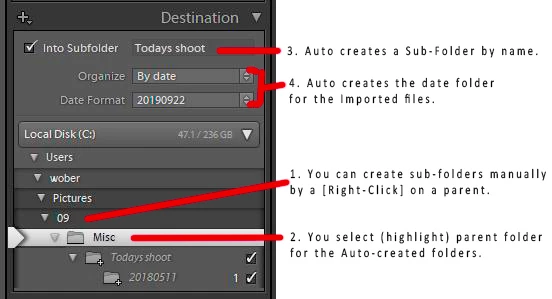
    I mostly prefer to use the "20190922" format (no slashes and 'Into subfolder' not ticked) as it gives me full control over exactly where I want to put my files. Thus if I highlight 2019 in the Destination panel I get a sub-folder 20190922 with the contained imported files.

    This format might suit you as you can define {2019/09/Misc/sub} exactly as you want.

    As an example I see this screen-clip with the settings shown-
    1 reply

    Rob_Cullen
    Community Expert
    Rob_CullenCommunity ExpertCorrect answer
    Community Expert
    September 22, 2019

    The Import Formats give complicated choices that took me ages to understand! (maybe still don't.:) )

    Expecially the formats that contain a forward slash.

    I suggest you read this blog article that can give more information than I can give here.

    https://www.lightroomqueen.com/import-create-dated-folders/


    I mostly prefer to use the "20190922" format (no slashes and 'Into subfolder' not ticked) as it gives me full control over exactly where I want to put my files. Thus if I highlight 2019 in the Destination panel I get a sub-folder 20190922 with the contained imported files.

    This format might suit you as you can define {2019/09/Misc/sub} exactly as you want.

    As an example I see this screen-clip with the settings shown-

    Regards. My System: Windows-11, Lightroom-Classic 15.3, Photoshop 27.5, ACR 18.3, Lightroom 9.3, Lr-iOS 10.4.0, Bridge 16.0.3 .