
Imports photos into the wrong folder.
Hi,
When importing pictures from any source LR recreates a folder I have removed and puts them in there. In the instance pictured, LR wants to import my pics into a 2022 subfolder inside the correct 2022 folder. Previously LR would create a dated folder inside the correct 2022 folder, as you would expect. Sometimes it imports pics into a folder called Di and Friends which I have also tried to remove numerous times. Also the top of the screenshot you can see that there is a checkbox available to me to put the pics directory into the Di and Friends subfolder, which I do not want. Also I am unable to select a different folder as the destination. These phenomena occur whether the pics are all of the same date of capture of more than one date.
As you can imagine this is irritating and a waste of time. If you know where I'm going wrong, I'd love to hear it.
Mamy thanks.
Many thanks.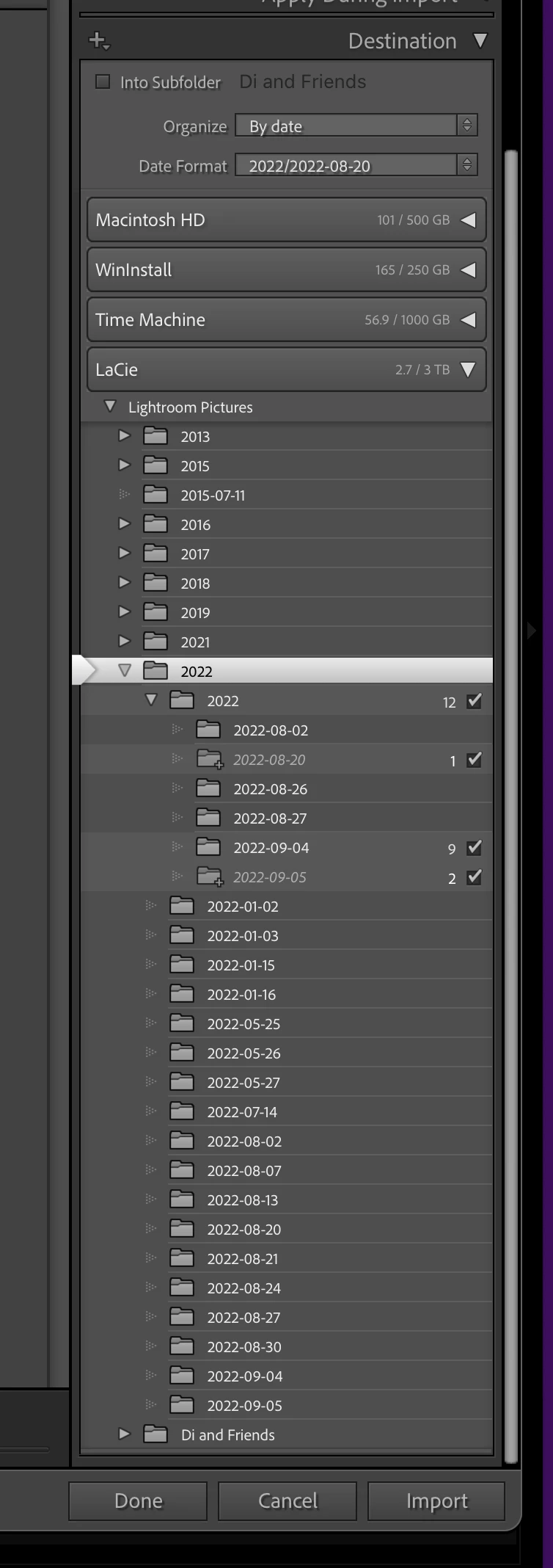


 AdChoices