Participating Frequently
February 19, 2021
Question

Impossible d'ouvrir LRC

  • February 19, 2021
  • 2 replies
  • 293 views

Bonjour, lorsque je veux ouvrir LRC, j'ai des messages d'erreurs comme indiqué sur le impression écran ci-dessous.
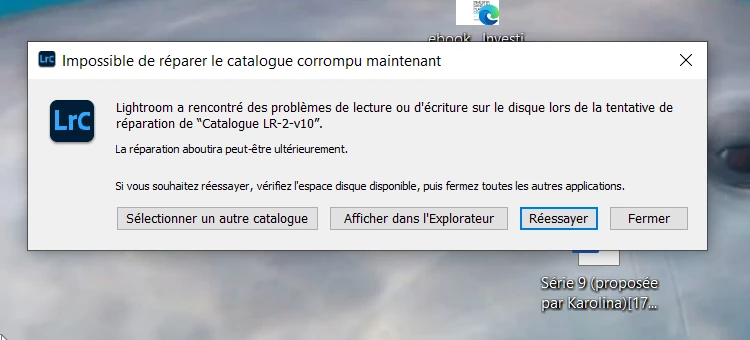
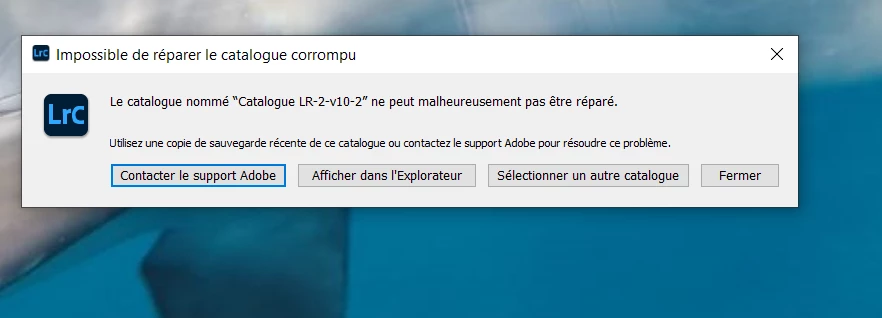
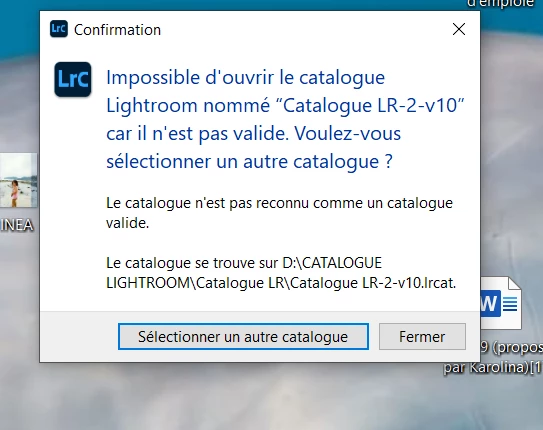
J'ai désinstalleé et réinstallé LRC, sans succés. J'ai plusieurs catalogues car j'ai le problème depuis longtemps ( en fait depuis la mise à jour vers la version 10.) et en alternant entre les catalogues, j'arrivé à en ouvrir un. Maintenant, plus rien ne s'ouvre. Merci de votre aide .

This topic has been closed for replies.

2 replies

KarukéraAuthor
Participating Frequently
February 22, 2021
Bonjour,

Merci pour votre réponse.
Juste une précision : Je suis actuellement avec Lightroom 10.1.1.
Est-ce qu’il faut que je désinstalle Lightroom 10.1.1 et que je réinstalle la version 9.4 ?
Ensuite , je dois ouvrir le fichier créé dans backup ?
Ensuite je fais la mise à jour vers Lightroom version 10.1.1 ?

En vous remerciant pour votre aide

Bernard Lanau
Chemin de Mon Repos 6
1033 Cheseaux-sur-Lausanne
Suisse
Mail : bernard-lanau@outlook.com

Provenance : Courrier pour Windows 10
Bernard L
Rob_Cullen
Community Expert
Community Expert
February 22, 2021

Est-ce qu’il faut que je désinstalle Lightroom 10.1.1 et que je réinstalle la version 9.4 ?

Do I need to uninstall Lightroom 10.1.1 and reinstall version 9.4?

I think not.  If the backup Catalog was from v9.4 then Classic v10 will ask to upgrade the restored catalog to v10 when it 'opens'.

Follow steps in this link to restore a catalog.

Catalog Backup Restore

Hopefully your backup catalogs are not corrupt also!


Regards. My System: Windows-11, Lightroom-Classic 15.3, Photoshop 27.5, ACR 18.3, Lightroom 9.3, Lr-iOS 10.4.0, Bridge 16.0.3 .
KR Seals
Community Expert
Community Expert
February 20, 2021

Look on your computer for a back up file. Lightroom Classic offers to make backup of the catalog. Have you been doing that.

The backup files will be in folders named by the date they were created. Find the newest one. The backup catalogs are zipped. You will have to unzip it before opening it in Lightroom Classic.

Reinstalling Lighroom Classic will have no effect on a bad catalog file.

If you saved your Lightroom Classic V9.x catalog, you can reinstall V9.4 and resume, using that.

Ken Seals - Nikon Z 9, Z 8, 14mm-800mm. Computer Win 11 Pro, I7-14700K, 64GB, RTX3070TI. Travel machine: 2021 MacBook Pro M1 MAX 64GB. All Adobe apps.