Participant
January 18, 2023
Answered

Improving Utility of Watermark

  • January 18, 2023
  • 2 replies
  • 323 views

I frequently use Lightroom Classic's Watermark feature to insert text into a greeting card template.  Sometimes after creating a watermark and giving it just the right name so I can find it again, I find I want to adjust it, change the text color, font or size and then have to give it a different name.  After a while, near-duplicate names clog the Watermark listing (I know where to find them, but it's pretty buried in menus).  It would be infinitely easier if you were given the choice (like you are in many other scenarios) to select, "This Watermark already exists, would you like to over-write it?"  That would make life much easier, as would the ability to delete Watermarks with a right click from the watermark listings.  I know that this is a rather unusual use of Watermarks, but I can't be the only one using RedRiverPaper's greeting card templates!
This topic has been closed for replies.
Correct answer Rob_Cullen

"This Watermark already exists, would you like to over-write it?"

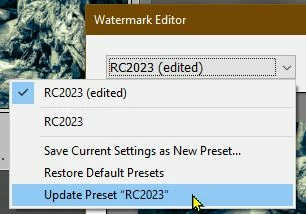
You can! It's called "Update"-

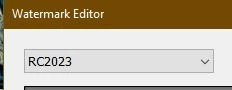
If you choose a watermark in the Name field-

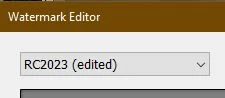
And you edit it in the Watermark Editor- the Name will now appear as Name-(Edited)

Now you have the option to 'Update' the watermark in the Name field Drop-down menu without creating new versions-

And it remains with the same 'original' name with the changes made.


2 replies

Rob_Cullen
Community Expert
Rob_CullenCommunity ExpertCorrect answer
Community Expert
January 18, 2023

"This Watermark already exists, would you like to over-write it?"

You can! It's called "Update"-

If you choose a watermark in the Name field-

And you edit it in the Watermark Editor- the Name will now appear as Name-(Edited)

Now you have the option to 'Update' the watermark in the Name field Drop-down menu without creating new versions-

And it remains with the same 'original' name with the changes made.


Regards. My System: Windows-11, Lightroom-Classic 15.4.1, Photoshop 27.8, ACR 18.4, Lightroom 9.4, Lr-iOS 10.4.0, Bridge 16.0.3 .
Participant
January 19, 2023

Thanks SO much...after doing this, I realized I remembered this from way back...but I had forgotten about the options presented in that top drop-down menu!  You're a prince!

johnrellis
Legend
January 18, 2023

Moderators, @Rikk Flohr: Photography, please move to Ideas.