



Participating Frequently
March 14, 2026
Question

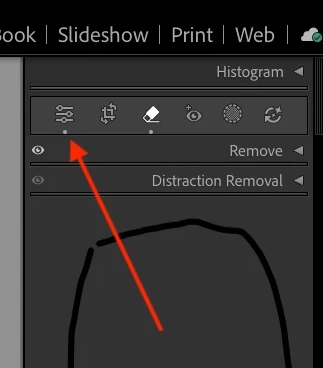
In Develop module and select Remove, all the other panels disappear.

  • March 14, 2026
  • 3 replies
  • 47 views

Here is a screen shot of the problem. All I am doing is selecting remove. The others disappear, switch to Library and back, and they all reappear.

    3 replies

    johnrellis
    Legend
    March 15, 2026

    [View this post in your web browser. It contains formatting and images that don't appear in email.]


    I hit the remove tool...Everything under DUST disappears.

    Right. When you’re done with Remove, hit the Edit button and all the other panels will reappear:


    kem070396Author
    Participating Frequently
    March 15, 2026

    AHHHHH ok, after I reset the preferences (I think? maybe?) and all that it now works!!!! The Edit button does indeed bring them back!!!! Thank you, I appreciate your help!!!

    johnrellis
    Legend
    March 14, 2026

    [View this post in your web browser. It contains formatting and images that don't appear in email.]


    ...or click the Edit button to see the other panels:


    kem070396Author
    Participating Frequently
    March 15, 2026

    I apologixe. Maybe I am not explaining this right. here is the Develop panel:


    OK. Now I want to remove something. I hit the remove tool:


    Everything under DUST disappears. Gone. Not there. 


    I hit Library. I Hit develop.

    And Basic< tone Curve, Color Mixer etc suddenly reappear. It never did that before. It might have to do with transferring from my old Mac to this mac, but it is very annoying and time consuming. I don’t think I can explain it any better. Should I call Adobe and have them screen share?

    johnrellis
    Legend
    March 14, 2026

    [View this post in your web browser. It contains formatting and images that don't appear in email.]


    Click the triangles to expand the Remove or Distraction Removal subpanels:


    kem070396Author
    Participating Frequently
    March 15, 2026

    You misunderstand...I am not talking about those tools. They work fine BUT

    look at this screen shot and then compare it to the previous shot...Basic, Tone Curve Color etc, all disappear until I pop out into library mode and back in

    johnrellis
    Legend
    March 15, 2026

    See my second reply above (I meant to include it in the first reply but hit Send by accident).