
AnOpticalView
Known Participant
September 25, 2026
Answered

In LR Classic to select every image within a stack on right click of mouse

  • September 25, 2026
  • 8 replies
  • 92 views

I use the fabulous autostack by time feature in LR Classic (latest version as of the date of this post).  This neatens and clarifies what is included in any stacks I have made most of which are in the hundreds of raw images.

However when I want to select a stack to export to other applications selecting the stack only grabs the first image and the stack must be laboriously expanded and then the firsts and last images must be selected (in windows) via the shift key.  This is not so easy when navigating down several pages of thumbnails.

A simple feature beneath the right click ‘stack’ option could be added to those already there to ‘Select all images in the stack’


Simplez 


cheers

Ian
    Correct answer Michael J. Hoffman

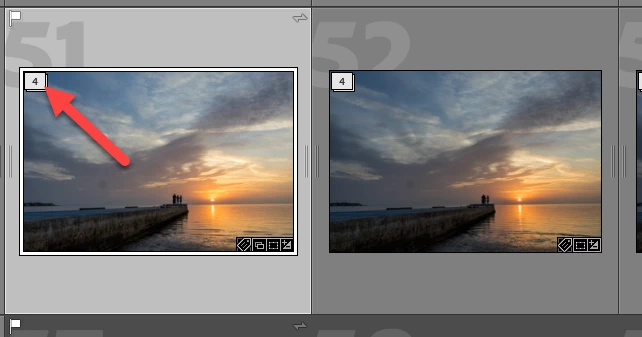
    Shift-Click the Stack number icon in the thumbnail to automatically expand and select all photos in the stack. This only works on one stack at a time; if you want to select all images from multiple stacks, you still have to unstack them (or use the menu to “Unstack all”:


    8 replies

    Califdan2
    Inspiring
    September 30, 2026

    It may not be relevent to your situaition and request, but to temporarily have the grid ignore stacking and show all images (in whatever sort order you have selected below the grid), Just add a colleciton to whatever folder or folders you have selected. I have an empty collection called “Empty Collection” for just this purpose.   

    Let’s say I have “Folder A” selected and it has all sorts of stacks in the grid, some expanded and some collapsed.  I then hold down the Ctrl key (win) or Cmd key (Mac) and click the “Empty collection” collection.  Now the grid ignores stacking and all images in Folder A appear, stacked or not.  When I’m done, I unselect the “Empty Colleciton” collection using the same method and all the images in the grid go back to showing the same stacks, some expanded, some collapsed as they did before.   You can read more about this here https://www.danhartfordphoto.com/blog/2022/4/lr014-lrc-tip01-all-photos-really  

    johnrellis
    Legend
    September 29, 2026

    [View this post in your web browser. It contains formatting and images that don't appear in email.]


    The answer recently marked correct (by a moderator?) is incorrect:

    this only works on one stack at a time; if you want to select all images from multiple stacks, you still have to unstack them (or use the menu to “Unstack all”


    To select all the photos from multiple stacks, including those in collapsed stacks:


    1. Click the first photo or stack to select it.

    2. Shift-click the last photo / stack.

    3. Right-click any of the selected photos and do Stacking > Expand Stack. This expands all the stacks in the selection.

    4. Shift-click the last photo, so all the newly expanded photos are also selected.


    Califdan2
    Inspiring
    September 28, 2026

    I’ve suggested before.  I’d like to see a toggle someplace on the Library Grid view (with a KBSC to flip the toggle) that would cause changes made to the top image of a stack to be automatically applied to all images in the stack.

    AnOpticalView
    Known Participant
    September 28, 2026

    Does not ‘sync to all’ apply any changes once one has selected all via the direction given by Michael J Hoffman below?

    JohanElzenga
    Community Expert
    Community Expert
    September 28, 2026

    It does, but if you want to sync settings over multiple stacks, then you would still have to expand each stack first and then select all images (like Michael says). So an option to sync all images in multiple collapsed stacks would still be a nice addition.

    -- Johan W. Elzenga
    Michael J. Hoffman
    Community Expert
    Michael J. HoffmanCommunity ExpertCorrect answer
    Community Expert
    September 25, 2026

    Shift-Click the Stack number icon in the thumbnail to automatically expand and select all photos in the stack. This only works on one stack at a time; if you want to select all images from multiple stacks, you still have to unstack them (or use the menu to “Unstack all”:


    AnOpticalView
    Known Participant
    September 25, 2026

    Thanks Michael, that works a treat