jonathanh41059766
Participant
January 31, 2023
Answered

In Print Layout with Multiple images ... How to Add a Caption Centered on the Page ?

  • January 31, 2023
  • 1 reply
  • 409 views

In a print layout with multiple, different images, how can a single caption be printed on the page (preferable centered along the bottom edge)? All I can figure out is how to add captions to each and every image.

Doing this in the Book module is not an option as I want my final image to be size not offered in the that module.

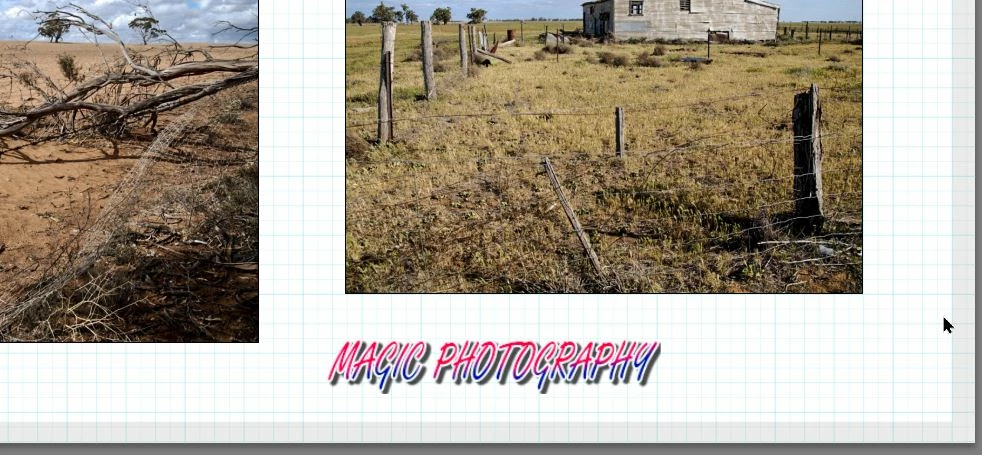
This topic has been closed for replies.
Correct answer Rob_Cullen

If you only need one, or a few, 'Captions' -create Identity Plate Presets that you can locate anywhere on a print page. (Graphical or Text)


Or, in the Book module - Use a page size close to your print needs, use 'Page text' that can be shifted on the page, Export the Book to JPG -  Edit the exported JPGs in Photoshop to Crop/Resize.

And you could also use Ps to add the Text Captions after you use the LrC Print module to [Print to File].


1 reply

Rob_Cullen
Community Expert
Rob_CullenCommunity ExpertCorrect answer
Community Expert
February 1, 2023

If you only need one, or a few, 'Captions' -create Identity Plate Presets that you can locate anywhere on a print page. (Graphical or Text)


Or, in the Book module - Use a page size close to your print needs, use 'Page text' that can be shifted on the page, Export the Book to JPG -  Edit the exported JPGs in Photoshop to Crop/Resize.

And you could also use Ps to add the Text Captions after you use the LrC Print module to [Print to File].


Regards. My System: Windows-11, Lightroom-Classic 15.1.1, Photoshop 27.3.1, ACR 18.1.1, Lightroom 9.0, Lr-iOS 10.4.0, Bridge 16.0.2 .
jonathanh41059766
Participant
February 1, 2023

Thanks, all good ideas. I'll most likely use PS to add the text after creating a JPG in LR. I'll first create a file in PS that contains a single, text only layer. I'll then use that file as a template, making it easy to add consistently styled text to the JPG files.


I'm not a fan of the Identity Plates in LR, as the text can't be placed over photos on the page, which is too limiting from a creative standpoint.

Rob_Cullen
Community Expert
Community Expert
February 1, 2023

"Identity Plates in LR, as the text can't be placed over photos on the page, "

I have no trouble moving an Identity Plate to any location on a print page, including "over photos".

It would be great if we could use an image with transparency in the Print module. A PNG Logo with transparent background could then be used as a 'photo cell' on any print. Unfortunately transparency is not possible and the logo photo fills its background with white. (Suitable if the Logo photo is 'off' other images on a white page.)


Regards. My System: Windows-11, Lightroom-Classic 15.1.1, Photoshop 27.3.1, ACR 18.1.1, Lightroom 9.0, Lr-iOS 10.4.0, Bridge 16.0.2 .