
Inspiring
July 17, 2023
Answered

In script directory loading a module from a lua script
  • July 17, 2023
  • 1 reply
  • 669 views

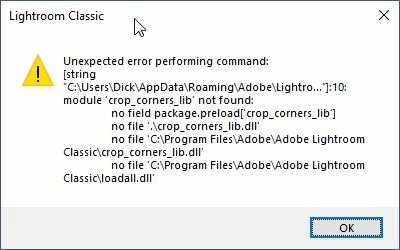
When I try to load a different module from a lua script in de script directory, I get an error.

I created a module from the crop-corners.lua script which John Ellis described on this forum.
That module I would like to insert = require


I tried all kind of variations to what works normally inside a plug-in, but with no luck.

local myModule = require 'myModule'


To be clear, the script is NOT a plug-in, but a lua file in the script directory. From this script I want to load a different module (lua script) in the same script directory.

This topic has been closed for replies.
Correct answer johnrellis

In that example, the file "script-require-1.lua" in the Scripts directory contains this:

return "Hello world"


1 reply

johnrellis
Legend
July 18, 2023

Interesting. The execution environment of scripts isn't documented, but clearly require() doesn't do the expected thing.


Here's a workaround:

local function scriptRequire (module)
    local LrFileUtils = import "LrFileUtils"
    local LrPathUtils = import "LrPathUtils"
    local appData = LrPathUtils.getStandardFilePath ("appData")
    local scripts = LrPathUtils.child (appData, "Scripts")
    local path = LrPathUtils.child (scripts, module .. ".lua")
    local contents = LrFileUtils.readFile (path)
    return loadstring (contents)()
    end

import "LrDialogs".message (scriptRequire ("script-require-1"))
johnrellis
johnrellisCorrect answer
Legend
July 18, 2023

In that example, the file "script-require-1.lua" in the Scripts directory contains this:

return "Hello world"


Inspiring
July 18, 2023

Thanks John, again, you hit the nail.


For those looking at this message after me, this solutions works also for modules


local function scriptRequire (module)
    local LrFileUtils = import "LrFileUtils"
    local LrPathUtils = import "LrPathUtils"
    local appData = LrPathUtils.getStandardFilePath ("appData")
    local scripts = LrPathUtils.child (appData, "Scripts")
    local path = LrPathUtils.child (scripts, module .. ".lua")
    local contents = LrFileUtils.readFile (path)
    return loadstring (contents)()
    end

local myModule = scriptRequire ("script-require-1")
local result = myModule.hello()
import "LrDialogs".message (result)


and

local myModule = {}

function myModule.hello()
	return "Hello world"
end

return myModule