

Infinite looping invalid numeric entry in Develop module
LR 2015.12 / CR 9.12 / Build 1125239 on Windows 10
When editing a photo in the Develop Module, I occasionally tab and shift-tab between values to quickly enter/change them, specifically the Presence (Clarity/Vibrance/Saturation) values. Sometimes when I do this, I get stuck into an infinite loop of modal error dialog boxes which is super annoying.
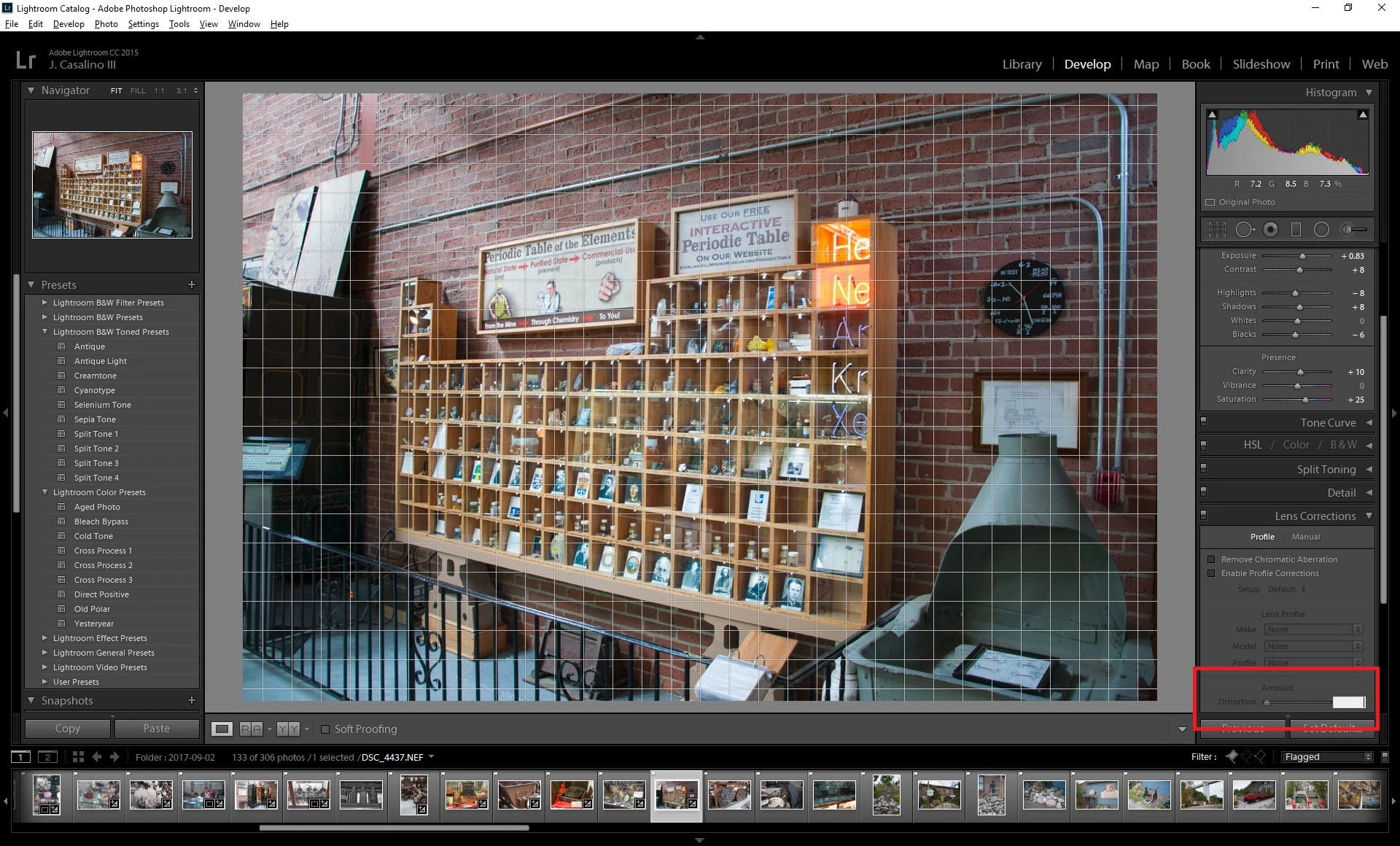
When the bug occurs, a grid appears on my photo, and the text box for entry next to "Distortion" appears enabled with focus, but I can't type anything in the box. Every time this text box loses focus, I get stuck in an infinite loop of modal dialogs popping up with "Invalid Numeric Entry. A number between 0 and 200 is required. Last value inserted." Unfortunately because the box is disabled, there is no last value, and focus continually returns to the disabled field I can't type anything into. Wash, rinse, repeat. I can't disable or collapse anything in the Develop module sidebar to pop focus back to an enabled text entry box.
Workaround:
Before today the only way I found to abort this was do what others have done - kill LR from the Windows Task Manager. However today I discovered I am sometimes able to break out of the cycle by clicking OK in the "Invalid Numeric Entry" box, then selecting "Help | About Adobe Photoshop Lightroom CC" in the menu bar. Another "Invalid Numeric Entry" error will pop up, but this time after acknowledging it, focus moves to the About screen, which I can then dismiss and continue using LR.
Steps to reproduce:
- Expand only the Basic and Lens Corrections items in the Develop module
- Validate that "Remove Chromatic Aberration" and "Enable Profile Corrections" are not checked.
- Modify a value in the Saturation field using text entry
- Hit TAB
- Grid will appear, text focus moves to Distortion field, you will get stuck in the infinite error loop of death.
Expected results: I should not be able to tab into disabled fields, and I should not get stuck into an error loop.


 AdChoices