
Participant
January 30, 2025
Question

Innerhalb eines Ordners werden nicht alle Fotos angezeigt

  • January 30, 2025
  • 2 replies
  • 237 views

Hallo Community, 


ich verzweifle gerade an einem Problem: Ich habe meine Fotos in Lightroom in Ordnern organisiert. Meist importiere ich erst mal in den Katalog und verschiebe dann nach in den jeweiligen Ordner. Ich bearbeite die Bilder und versehe sie mit Attributen wie versch. Anzahl von Sternen und versch. Farben. 


Aus irgendeinem Grund bekomme ich, auch wenn ich die Filter entferne, nie alle Bilder angezeigt.


Beispiel: Ich habe über 1000 Fotos in meinem Urlaub gemacht, viele gelöscht. Laut Lightroom sind noch 612 Fotos in meinem Ordner "Korsika", es werden aber nur 557 angezeigt.  Ich dachte, es sei ein Filter-Problem, aber auch, wenn ich alle Filter entferne, entweder mit Command & L oder über das Menu (s. Screenshot), werden nach wie vor nur 557 Fotos angezeigt.
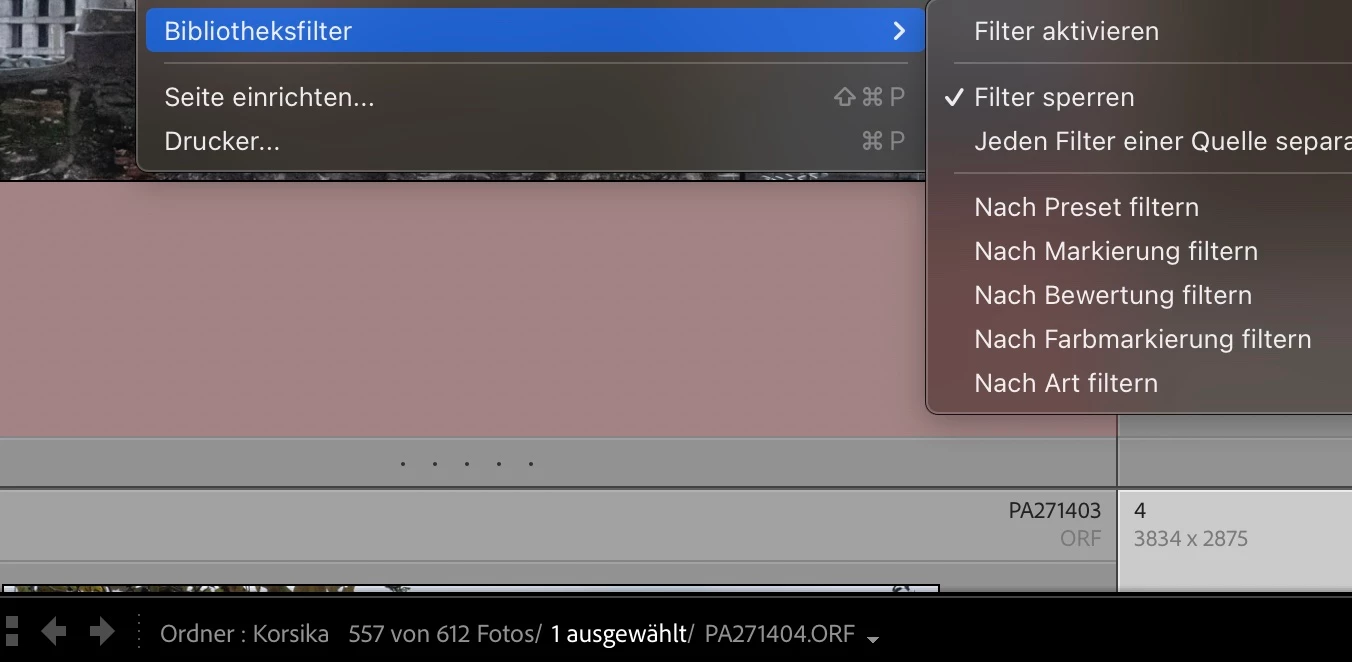
Das ist nicht in allen Ordnern so, aber in fast allen mit mehr als 100 Fotos.


Wer hat eine Idee, woran das liegen kann bzw., wie ich wieder auf alle Bilder in einem Ordner zugreifen kann? 


Tausend Dank im Voraus für eure Hilfe!

Nadia

2 replies

beatem37048019
Participant
June 21, 2026

Ich verstehe nicht, was Standard spalten sind und wo ich dies einstelle

Community Expert
June 22, 2026

Unfortunately you haven't given us any information about your system. Therefore, all proposed solutions are a look into the crystal ball.

Please give us a detailed description of you issue. 

What exactly you’re trying to do?

What do you like to get and what do you really get?

Please describe the steps you’re doing, so we can try to reproduce.

Please provide a copy of your 'System Info'. This can be get from the Lightroom menu item Help > System Info. There's a copy button in the System Info dialog. Press this button and paste the info into a text file and attach it to your next forum post.


Rather than reactivating an old thread that is seemingly similar, you are posting to a new thread with fresh, complete information. if the issue is really the same, we will merge you back into the appropriate location.

My System: Intel i7-8700K - 64GB RAM - NVidia Geforce RTX 3060 - Windows 11 Pro 25H2 -- LR-Classic 15 - Photoshop 27 - Nik Collection 9 - PureRAW 6 - Topaz Photo AI
MassC
Legend
January 31, 2025

Hi @nadiao47664453

I completely understand how confusing and frustrating that can be. Could you try going to the bottom left of LrC and selecting "Default Columns"? If that doesn’t work, please repeat the steps and try selecting a different option, such as "Camera Info" instead.

Let me know if this helps. 


^CM