
Participant
July 6, 2021
Question

Installing Lightroom 6

  • July 6, 2021
  • 5 replies
  • 1094 views

Please, can someone advise me on how to instal Adobe Photoshop Lightroom 6 which I've purchased about 5 years ago and have been using since but somehow it's not working now. I attach a screenshot of what shows up when I tried to open the app. I'm not aware of uninstalling the app. 
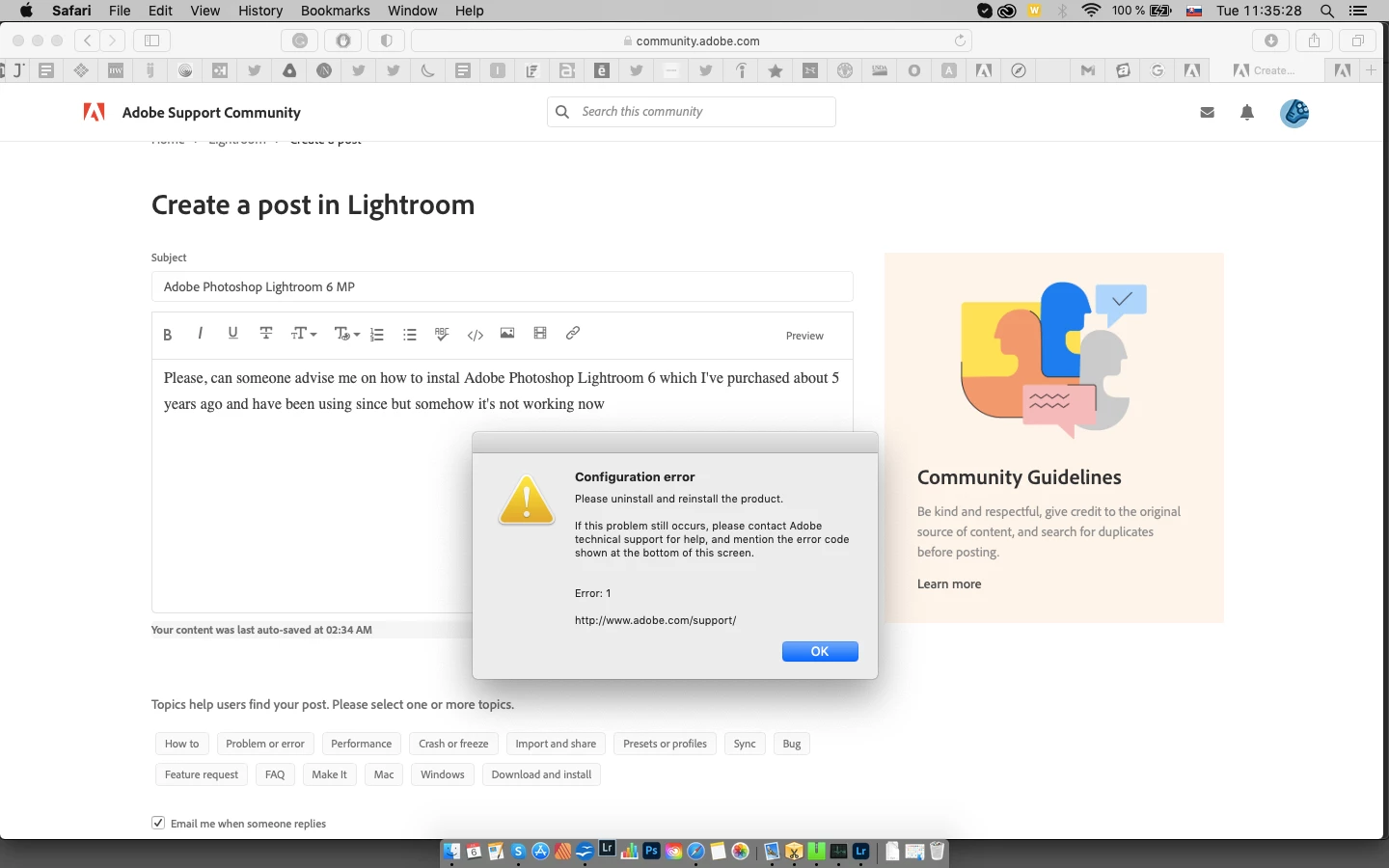


{Moved from Lightroom Cloud to Lightroom Classic Forum by Moderator} 

This topic has been closed for replies.

5 replies

DdeGannes
Community Expert
Community Expert
July 7, 2021

Over 14 hours ago I made an initial response to the original post. The info presented was not clear and lacked a lot of basic info. I first thought of just requesting basic info OS details etc to make an informed response. However, I acted on a hunch that the user had Lr 6 installed and functioning and he may have run into problems after updating his operating system. I was planning to wait for a response from the Author of the thread.

Subsequently, I updated my thoughts when I realized there were more responders.

The author of the thread has not participated after his initial question. I will wait for further input from the author.


Regards, Denis: iMac 27” mid-2015, macOS 11.7.10 Big Sur; 2TB SSD, 24 GB Ram, GPU 2 GB; LrC 12.5,; Lr 6.5, PS 24.7,; ACR 15.5,; (also Laptop Win 11, ver 24H2, LrC 15.0.1, PS 27.0; ) Camera Oly OM-D E-M1.
GoldingD
Legend
July 6, 2021

Inquiry to other members.

If the OP accidentally installed ACCDA, or heck, installed it on purpose, perhaps for other than LrC, Would that foul up the old pre subscription installer?


Rob_Cullen
Community Expert
Community Expert
July 7, 2021

Would that foul up the old pre subscription installer?

Yes, I believe it does.

If Creative Cloud Desktop App is installed, any install of Lightroom v6 will be identified as a CC version (by subscription).

It would be necessary to Sign-out  and un-install the CC Desktop App before installing v6

*Note that v6 CANNOT be installed with Catalina or BigSur OS.


Regards. My System: Windows-11, Lightroom-Classic 15.1.1, Photoshop 27.3.1, ACR 18.1.1, Lightroom 9.0, Lr-iOS 10.4.0, Bridge 16.0.2 .
GoldingD
Legend
July 6, 2021

Several possible issues, but first some clarity is requested.


You state Lr v6, Ok, you state bought as in not subscribed, you state 5 years ago, Ok Adobe ended with v6.14 December 2017.


BUT, as noted, by Johan W. Elzenga, up top you have the Adobe Creative Cloud Desktop App installed and running.


Have you started a subscription to say, the Adobe Photography Plan? If so, why attemt to installv6?


With the Adobe Creative Cloud Desktop App (ACCDA), error 1 can reflect a failed install of ACCDA. If you bring the ACCDA up, and sign out, then sign in, dies sn error pop up?


Also, at least one thread (not about Lr 6) the members MAC had a wrong time zone (wrong time as well, can cause ACCDA issues)


JohanElzenga
Community Expert
Community Expert
July 6, 2021

What version of MacOS are you using? If it is more recent than MacOS X High Sierra, then you cannot install Lightroom 6 on it. Lightroom 6 is 64 bits, but the installer is 32 bits. I do see the creative cloud icon in your menu bar however, so are you sure you are trying to install the old Lightroom 6 and not Lightroom Classic or Lightroom desktop? And if so, why? Lightroom 6 is obsolete software.


-- Johan W. Elzenga
DdeGannes
Community Expert
Community Expert
July 6, 2021

Johan, Lr 6 is already installed and it appears that a Mac upgrade is causing the problem. Just my take on the original post. I think Lr 6 will not boot because it cannot access the Catalog because of a permissions problem. The original post is not clear, it indicates “and have been using since but somehow it's not working now.” just a hunch!


Regards, Denis: iMac 27” mid-2015, macOS 11.7.10 Big Sur; 2TB SSD, 24 GB Ram, GPU 2 GB; LrC 12.5,; Lr 6.5, PS 24.7,; ACR 15.5,; (also Laptop Win 11, ver 24H2, LrC 15.0.1, PS 27.0; ) Camera Oly OM-D E-M1.
JohanElzenga
Community Expert
Community Expert
July 6, 2021

@DdeGannes wrote:

I think Lr 6 will not boot because it cannot access the Catalog because of a permissions problem.


OK, I missed that Lightroom is already installed. I'm pretty sure that catalog permissions isn't the problem however. If there is a permission problem with the catalog, then you'll get a different error message that clearly tells you there is a permission problem with the catalog:


More likely it's the preferences (reset them to try that). Please note: The error dialog talks about uninstalling and reinstalling, but that won't work for Lightroom 6 if MacOS is 64 bits only.


The question remains why I see the Creative Cloud app in the menu bar if the OP is using Lightroom 6...


-- Johan W. Elzenga
DdeGannes
Community Expert
Community Expert
July 6, 2021

Have you recently updated your Mac operating system? If so advise the version number that is now installed.

Also, add a screen capture of the system preferences for files and folders. See sample below.


Regards, Denis: iMac 27” mid-2015, macOS 11.7.10 Big Sur; 2TB SSD, 24 GB Ram, GPU 2 GB; LrC 12.5,; Lr 6.5, PS 24.7,; ACR 15.5,; (also Laptop Win 11, ver 24H2, LrC 15.0.1, PS 27.0; ) Camera Oly OM-D E-M1.